Social media scheduling
Live

AdaptlyPost lifetime deal

The AdaptlyPost lifetime deal includes social scheduling, API access and MCP connections for AI assistants. Current offer status: Available. The main buying question is whether your profiles, collaborators and monthly X/AI use fit the same tier—X posts with clickable links can consume the allowance much faster than ordinary posts.

STARTING PRICE

$59one-timeBuy now
Table of contents

Who is AdaptlyPost for?

Choose by the busiest month you need to publish, then check accounts, people and workspaces. Tier 1 can fit a solo publisher, but a separate teammate or several brands may require a higher tier even with few social accounts. Buy for the documented scheduling and assistant workflow; a social inbox, dedicated client sign-off and connected threads are not sufficiently established to base a purchase on.

Suitable for

A creator or team that wants an assistant to prepare posts while a person checks the content and publishing destination.

Consider another option if

Choose another workflow if dedicated client sign-off or confirmed connected-thread publishing is essential; those capabilities remain unresolved.
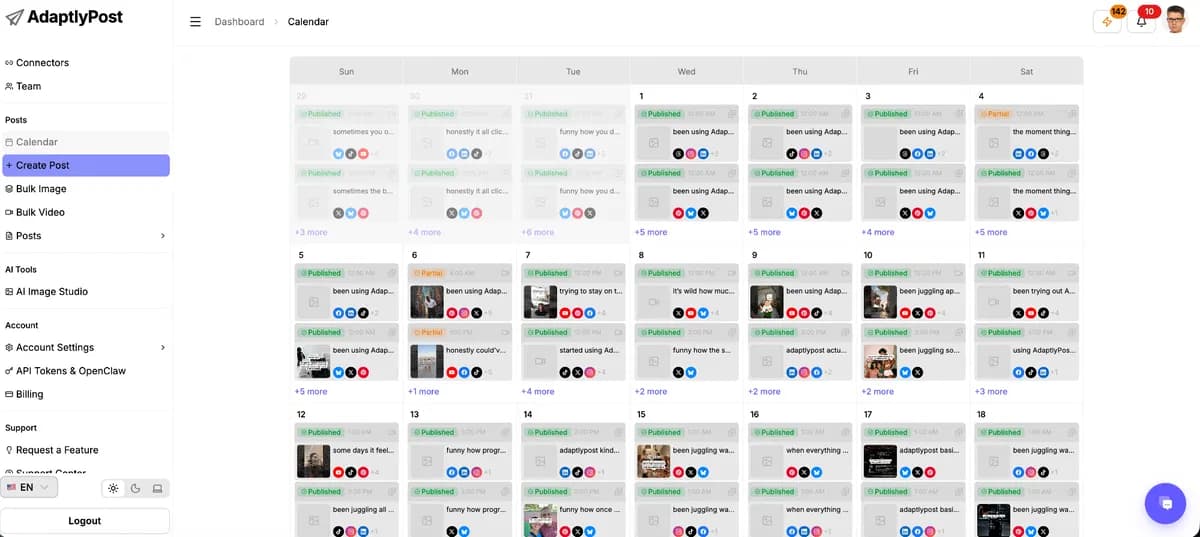
AdaptlyPost monthly social calendar showing scheduled posts.

What comes with the lifetime deal?

Activation, changes and refunds

Activate within 60 days of purchase. Upgrade while the offer is available; downgrade within 60 days. The listing offers a 60-day refund period. Licenses do not stack.

Future plan updates

Tier 1 maps to Creator, Tier 2 to Pro and Tiers 3–5 to Enterprise updates, including a replacement plan name if renamed.

Included connectivity

API and MCP access are included across lifetime tiers. The allowance for connected accounts, people and workspaces still applies.

Credit costs

An AI caption or standard AI image uses two credits; a premium image uses four. Ordinary X posts use two credits, while clickable-link X posts use twenty. Other publishing is not charged these credits.

Tier 5 white-label

The founder confirms your domain, logo, brand and email sender, with billing/support/referral links hidden on the branded client dashboard. You handle client billing yourself.

Unresolved extras

The founder confirms in-app credit top-ups, but pack prices, expiry, rollover and the exact monthly reset date remain unconfirmed. Do not multiply the allowance by workspace count. Outside assistants and automation services may cost extra.

Meaning of lifetime

Access lasts for the product’s life. The founder explicitly says service closure would end access; a one-time purchase is not a promise of permanent operation.

PLANS AND PRICING

AdaptlyPost plans and pricing

Prices and allowances are shown for each plan below.

PLAN DETAILS

Compare each plan’s price and allowance. Confirm any limit marked ‘Not specified’ before buying.

AdaptlyPost plans and limits · USD
Plan comparison5 plansTier 1License Tier 1Tier 2License Tier 2Tier 3License Tier 3Tier 4License Tier 4Tier 5License Tier 5
PriceUSD$59one-time$139one-time$329one-time$499one-time$799one-time
BillingOne-time paymentOne-time paymentOne-time paymentOne-time paymentOne-time payment
Connected accounts2550100250500
Users152050120
Workspaces31550150400
CreditsCheck plan notes for usage and renewal periods.2006001,4003,0005,000
Who this tier fitsA solo publisher working within 3 workspacesA writer and publisher who need separate access, or a brand setup that exceeds Tier 1Frequent X-link publishing or client work that exceeds Tier 2’s credits or account capacityAn agency whose busy month exceeds Tier 3’s account, team or credit allowanceA service that needs a branded client dashboard, or capacity beyond Tier 4
Keep in mindX links and AI share 200 monthly credits; ten clickable X links use 200 before generation.Thirty clickable X posts need 600 credits; generating thirty captions adds another 60.A 1,380-credit example leaves little room within 1,400 credits for revisions or extra posts.The higher allowance does not add a confirmed client approval portal or change each network’s restrictions.You handle client billing separately. Confirm that the included branding covers your intended service.
Plan notes
  • Monthly credits cover AI and X use; ordinary X posts cost two credits and clickable-link posts cost twenty.
  • AI captions and standard images cost two credits each; premium images cost four.
No additional notes recordedNo additional notes recordedNo additional notes recorded
  • White-label includes your domain, logo, brand and email sender; billing, support and referral links are hidden on that domain.
  • You handle client billing separately; this is not an automated client billing service.

Select the final tier on AppSumo. The product link opens the same listing for every tier.

Costs and limits to account for

  • Monthly credits belong to the account, not each workspace. The founder describes one-time or recurring allocations to team members; creating more workspaces does not multiply the allowance.
  • Thread support is unclear: the API documents connected replies, while a support article still excludes them. Confirm your exact workflow.
  • External assistants may have their own subscription costs.

Which tier fits your workload?

Count connected accounts, people, workspaces and credits separately. A spare account slot cannot cover a second teammate or an exhausted credit balance. API and MCP access are included across the lifetime tiers, so automation alone does not require an agency plan.

Count the social profiles/pages you will connect, the brands you will organize separately and the people needing access. Four brands with five destinations each means 20 connections and four workspaces. For one person and no credit use, the smallest plan covering those needs is Tier 2 · $139 once · 600 credits spare.

Count yourself and each colleague when planning. The published terms do not settle whether owners, Viewers, clients or the same person in several workspaces count differently. Confirm the rule before paying for a plan that leaves no spare seats.

Estimate a busy month, not just an average week. The founder confirms that the allowance belongs to the account rather than each workspace. Team allocations divide that budget; they do not establish additional included credits. Leave room for extra campaigns and AI drafts you regenerate.

  • Tier 5 is the documented white-label option. More credits alone do not make its branding capability necessary for a solo creator.
  • If the work already fits the native social apps and you do not need a shared calendar or automation, continuing that workflow avoids buying unused software.
  • Future Creator, Pro and Enterprise updates are mapped to the lifetime tiers, but the vendor’s subscription plans have different numerical limits. Use the AppSumo table above for this purchase.

How X and AI credits add up

The founder lists credit charges for AI generation and X publishing. Scheduling volume on other networks does not consume those credits, but generating the content can. A clickable-link X post costs 20 credits in total for publishing, not 20 plus the ordinary two-credit charge.

For standalone posts, estimate monthly credits as: (ordinary X posts × 2) + (clickable-link X posts × 20) + (AI caption actions × 2) + (standard AI images × 2) + (premium AI images × 4). Count generation actions rather than the number of final assets you keep. Extra generations can increase the budget.

One link post plus one generated caption and one premium image is 26 credits. Seven such sets use 182 credits; eight use 208. Compare those totals with Tier 1’s current 200 monthly credits. An allowance is not a promise of that many finished posts.

Documented action rates; arithmetic assumes standalone posts and no refunds or bonus credits.
ActionCreditsPlanning consequence
Ordinary X post2Publishing only: divide your monthly allowance by two.
X post with a preserved clickable link20Ten posts consume 200 credits before any AI generation.
AI caption action250 actions use 100 credits.
Standard AI image225 images use 50 credits.
Premium AI image425 images use 100 credits.
Publishing to a non-X network0 for publishingOptional AI generation still uses its own credits.
  • For API publishing, links are broken up by default. The documented keep-links option preserves a clickable X link at the higher rate. Pasting a URL alone is not proof that it will stay clickable.
  • The API also applies the higher link rate to an X first comment. The simple examples exclude comments, thread replies, failed attempts and retries because their full charging behavior has not been established.
  • A published credit rate does not demonstrate delivery reliability. Check the final post and destination link during actual testing.

Tier recommendations for six publishing workloads

The examples below calculate a month of work from the published allowances. They assume one account-level credit balance, no rollover or top-ups, and no extra charged actions. Adjust these planning examples to your own posting schedule.

Use the row closest to your work, then adjust for your own account types, team and extra generations. If no tier covers the result, reduce the charged actions or get a top-up quote. A historical fit for a sold-out offer is not a recommendation that it can still be purchased.

Editorial calculations using the current five-tier offer and one account-level credit allowance. People include the owner for conservative planning; actual seat-counting rules remain unconfirmed.
Monthly workflowCapacity neededCredit calculationSmallest listed fit
Solo mixed publishing8 accounts · 1 person · 2 workspaces20 ordinary X posts × 2 + 40 captions × 2 + 10 standard images × 2 = 140Tier 1 · $59 once · 60 credits spare.
Writer plus publisher8 accounts · 2 people · 2 workspacesSame 140-credit workload as above.Tier 2 · $139 once · 460 credits spare.
Daily X link with an AI caption4 accounts · 1 person · 1 workspace30 X links × 20 + 30 captions × 2 = 660Tier 3 · $329 once · 740 credits spare.
Agency near its credit ceiling70 accounts · 8 people · 20 workspaces50 X links × 20 + 150 captions × 2 + 20 premium images × 4 = 1,380Tier 3 · $329 once · 20 credits spare.
Larger publishing operation150 accounts · 30 people · 60 workspaces80 X links × 20 + 400 captions × 2 + 50 premium images × 4 = 2,600Tier 4 · $499 once · 400 credits spare.
Heavy X-link publishing10 accounts · 1 person · 1 workspace260 X links × 20 = 5,200 before any AI.No listed tier covers this workload without extras.
  • For the 660-credit workload, compare a fitting tier with fewer chargeable actions or a confirmed top-up quote. Writing captions yourself reduces the modeled requirement to 600. For four accounts, one person and one workspace, that result is Tier 2 · $139 once · 0 credits spare.
  • Adding ten clickable X links to the 1,380-credit example raises it to 1,580. For the same 70 accounts, eight people and twenty workspaces, the result becomes Tier 4 · $499 once · 1,420 credits spare.
  • A white-label requirement overrides these capacity-only recommendations: the founder identifies that capability with Tier 5.

Extra costs, top-ups and terms to confirm

The unresolved purchase cost is extra credits: in-app top-ups exist, but their pack prices, expiry and automatic-purchase behavior were not confirmed. If your campaign exceeds the included balance, get that quote before deciding a lower tier will be cheaper.

Add any paid assistant, automation service and separate engagement or reporting tool you still need. Compare that total with an alternative covering the same work over the same period. A scheduler with fewer accounts may still be the cheaper option if it already includes a feature you would otherwise buy separately.

Costs to investigate before paying; unknown prices are not assumed to be zero.
Possible extraWhat is establishedWhat it means for your decision
Extra creditsThe founder confirms purchases inside the app. Pack prices, expiry and automatic-purchase behavior were not confirmed.Get the actual pack quote before comparing a lower tier plus top-ups with a higher tier.
Rollover and reset timingThe listing says credits per month. Rollover and the exact reset day were not established.Do not fund a busy month with assumed leftover credits; confirm the cycle before scheduling a large campaign.
Workspace allocationCredits are allocated per account, with one-time or recurring transfers to team members described by the founder.Use a single tier allowance across your workload. More workspaces do not create extra included credits.
Outside AI or automationAPI/MCP access is included; an external service can have its own paid plan or usage bill.Keep external generation costs separate from AdaptlyPost credits. Included connectivity does not pay the outside provider.
Client operationsThe founder says you handle client billing for a white-label service.Budget for your chosen billing tools and staff time if needed; they are not included in the tier price.
Separate purchase termsAn in-app credit purchase is distinct from the AppSumo license.Do not assume the license refund window also refunds consumed credits or other separately purchased services.
  • Confirm seat counting, the monthly reset, rollover, top-up expiry and failed-post charges if the planned workload leaves little spare capacity. Upgrades depend on the deal remaining available, so a later upgrade is not guaranteed.

FEATURE COMPARISON

Features, limits and paid extras

“Included” and “unlimited” can mean different things. This checklist separates full access, usage limits, add-ons and features that are not confirmed.

Feature coverage7 / 13

7 fully included · 4 limited · 0 add-on · 0 not included · 2 not confirmed. Coverage is not a quality score.

IncludedLimitedPaid add-onNot includedNot confirmed

Features are grouped by documented coverage. “Not confirmed” means the evidence is incomplete, not that a feature is absent.

Social media scheduling: documented features and conditions
FEATURESFeature comparisonAdaptlyPostLifetime deal
Included7 features
Scheduled publishingPrepare posts for a later date and time.
Included

Scheduled posts; X uses two credits, or twenty with a clickable link.

Bulk schedulingLoad or schedule multiple posts in one workflow.
Included

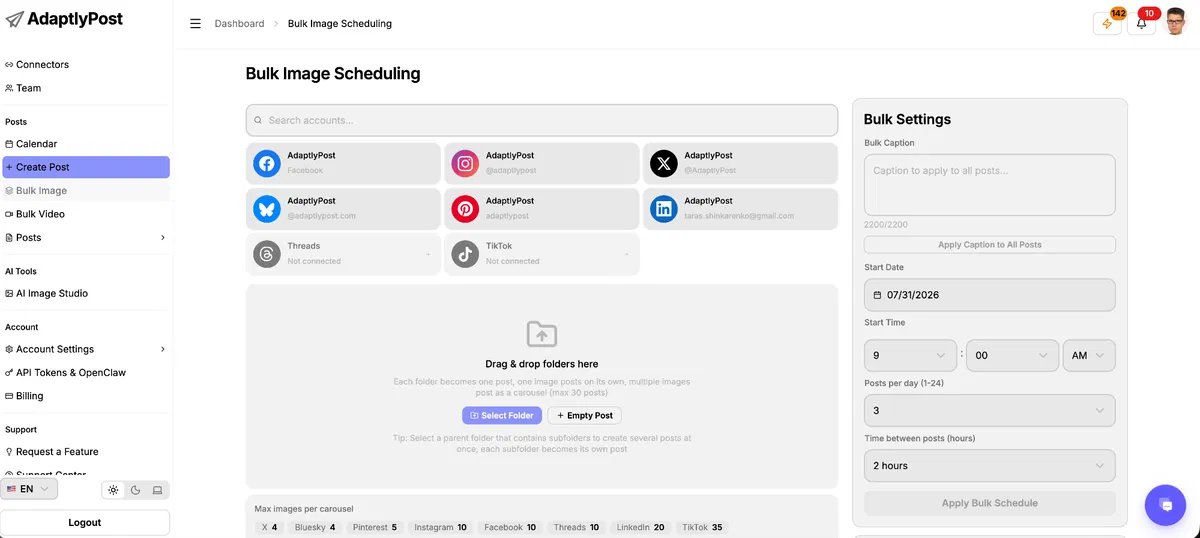
Prepare multiple posts in one batch; review each destination, caption and publishing time before scheduling.

API accessConnect external software through a documented programming interface.
Included

No separate API subscription.

AI assistant / MCP accessConnect a compatible assistant to supported product actions.
Included

Connect a supported MCP assistant to prepare or schedule posts. The assistant service can charge separately.

Performance analyticsRead supported account or post performance metrics.
Included

Metrics vary by connected platform.

RSS publishingTurn updates from a feed into social content.
Included

Listed in current plan features.

Separate workspacesOrganize brands or clients in separate working areas.
Included

3 workspaces in Tier 1.

Limited4 features
AI writingGenerate or refine post text within the purchased product.
Limited

Two credits per caption.

AI image generationCreate images within the purchased product, subject to credits.
Limited

Two credits per standard image; four per premium image.

Approval workflowRequire review or approval before another person publishes.
Limited

Contributors prepare their own drafts; Editors or Admins publish. Dedicated client sign-off is not established.

Recurring contentAutomatically reuse or repeat scheduled evergreen content.
Limited

The MCP create_post action supports daily, weekly, monthly and yearly recurrence. Automatic evergreen rotation is not established.

Not confirmed2 features
Social inboxHandle supported comments or messages in a shared interface.
Not confirmed

Current inbox scope not established.

Connected thread schedulingSchedule a linked sequence of posts, not just one standalone post.
Not confirmed

API docs describe connected replies; the help article still excludes thread scheduling. Confirm the intended workflow before buying.

Check each product’s plan notes for tier limits and additional costs. Feature coverage is not a quality rating.

USE CASES

What problems does AdaptlyPost solve?

01

Let an assistant prepare content without letting it publish

An assistant preparing posts could publish to the wrong account if it has publishing access. A request in the prompt to wait for approval is not a substitute for restricting that access.

How to use it

  1. Create a workspace for the relevant brand and connect only its intended accounts.
  2. Give the drafting person or API key Contributor permissions. Have the assistant save a draft, then inspect the text, media and destination.
  3. An Editor or Admin reviews the finished version and schedules it. Keep the intended time in your planning process until approval.

What this helps you do: Contributor permissions apply to the dashboard, API and MCP. They allow preparation of the contributor’s own drafts while withholding scheduling and publishing.

Limitations: This is a draft-to-publisher handoff, not evidence of a dedicated client approval portal. Tier 1’s listed user limit is 1; a separate teammate needs sufficient team capacity.

02

Schedule Pinterest content without counting every board as an account

A business can organize one Pinterest profile into many boards. Treating each board as a separate paid account could lead you to buy far more capacity than you need.

How to use it

  1. Count connected Pinterest accounts, then map each planned Pin to its board.
  2. Prepare the individual title, description, destination link and intended time before batching the work.
  3. Inspect a small batch before filling the calendar, especially when several Pins lead to different pages.

What this helps you do: The founder confirms that one Pinterest account uses one account slot regardless of its board count, and bulk Pins can each have their own board and publishing details.

Limitations: The account allowance is only one constraint. Verify the exact media format and batch workflow before moving a large campaign.

03

Move approved content from an assistant into a visible schedule

An assistant can write a good caption while leaving you to copy the final content, choose accounts and schedule it manually. The handoff is where mistakes can enter.

How to use it

  1. Connect an active AdaptlyPost account and social profile to a supported MCP client.
  2. Give the assistant the approved version, workspace, account, timezone and publication time. Request a draft first if review is still outstanding.
  3. Inspect the returned post record and its status. After a failure, inspect the existing record before retrying rather than creating a second copy.

What this helps you do: The documented connector supports creating drafts or scheduled posts and reading their status. This connects content preparation to the scheduler without requiring the same text to be pasted again.

Limitations: External assistants can have separate charges. The founder says post creation has no Idempotency-Key protection: retaining and checking the returned post ID matters when an automation is interrupted.

04

Read LinkedIn results without comparing unlike measurements

A report can look incomplete when a company page and a personal profile do not expose the same measurements. Buying more account capacity does not change what LinkedIn provides.

How to use it

  1. Separate company-page results from personal-profile results in your reporting.
  2. Use per-post measurements where available; use profile-level trends for personal profiles.
  3. Record your own campaign goal, such as qualified site visits, alongside publishing activity rather than treating every visible engagement as a business result.

What this helps you do: Both account types support publishing, including image posts through API/MCP. The founder distinguishes per-post company-page analytics from aggregated personal-profile analytics.

Limitations: Do not promise clients identical reporting across account types or every network. The current video-publishing answer also excludes audience demographics.

BUYER FEEDBACK

What buyers say

Buyer experiences can vary with the plan, product version and workflow.

DO THE MATH

What could you save?

Compare the cash cost of named plans over your chosen period.

Add recurring extras
AdaptlyPost$59.00License Tier 1 over 36 months
Buffer$180.00Essentials · 1 channel · 1 paid channel
Potential cost difference $121.00less spent on the lifetime option

Different plans, different capabilities. This is a cost scenario, not a promise of equal features or future savings. AdaptlyPost: 25 accounts, 1 user. Buffer: 1 paid channel. Annual plans are charged for full years. Prices stay constant; taxes, usage overages, external services and migration work are excluded unless added above. A lifetime licence lasts under the vendor’s terms, not a guarantee that the business will operate forever.

Buffer’s Free plan includes API access and may be sufficient for a small workflow. The paid-channel scenario does not assume free channels can be combined with paid ones.

ALTERNATIVES

AdaptlyPost alternatives and comparisons

IncludedLimitedPaid add-onNot includedNot confirmed

Features are grouped by documented coverage. “Not confirmed” means the evidence is incomplete, not that a feature is absent.

Social media scheduling: documented features and conditions
FEATURESFeature comparisonAdaptlyPostLifetime dealPostlyLifetime offer endedBufferSubscription alternative
Included in every compared tool2 features
Scheduled publishingPrepare posts for a later date and time.
Included

Scheduled posts; X uses two credits, or twenty with a clickable link.

Included

Historical LTD scope.

Included

Free has a refillable ten-post queue per channel. Paid queues have a 5,000-post fair-use ceiling.

Performance analyticsRead supported account or post performance metrics.
Included

Metrics vary by connected platform.

Included

Described in the historical listing.

Included

Advanced analytics on Essentials.

Where coverage differs5 features
Bulk schedulingLoad or schedule multiple posts in one workflow.
Included

Prepare multiple posts in one batch; review each destination, caption and publishing time before scheduling.

Included

Historical LTD scope.

Limited

CSV upload on all plans: text and single-image posts only, not YouTube, videos or carousels. Free queue limits still apply.

AI writingGenerate or refine post text within the purchased product.
Limited

Two credits per caption.

Limited

Historical Plan 1: 4,000 words/month.

Included

AI Assistant.

API accessConnect external software through a documented programming interface.
Included

No separate API subscription.

Paid add-on

LTD API add-on required.

Included

Available on Free with shared request limits; full stable analytics and comment replies are not provided by the current API guide.

AI assistant / MCP accessConnect a compatible assistant to supported product actions.
Included

Connect a supported MCP assistant to prepare or schedule posts. The assistant service can charge separately.

Paid add-on

Included with the LTD API add-on.

Included

Also available on Free.

Approval workflowRequire review or approval before another person publishes.
Limited

Contributors prepare their own drafts; Editors or Admins publish. Dedicated client sign-off is not established.

Included

Historical listing includes workflow approval.

Limited

Approval workflows and additional teammates require Team; Free and Essentials have one user.

Evidence still incomplete6 features
AI image generationCreate images within the purchased product, subject to credits.
Limited

Two credits per standard image; four per premium image.

Not confirmed

Support for this plan has not been confirmed.

Not confirmed

Support for this plan has not been confirmed.

RSS publishingTurn updates from a feed into social content.
Included

Listed in current plan features.

Not confirmed

Support for this plan has not been confirmed.

Limited

Content feeds support selecting articles for posts; unattended RSS publishing needs an external integration such as Zapier.

Separate workspacesOrganize brands or clients in separate working areas.
Included

3 workspaces in Tier 1.

Included

Historical Plan 1: five workspaces.

Not confirmed

Support for this plan has not been confirmed.

Recurring contentAutomatically reuse or repeat scheduled evergreen content.
Limited

The MCP create_post action supports daily, weekly, monthly and yearly recurrence. Automatic evergreen rotation is not established.

Included

Recurring posts.

Not confirmed

Support for this plan has not been confirmed.

Social inboxHandle supported comments or messages in a shared interface.
Not confirmed

Current inbox scope not established.

Not confirmed

Support for this plan has not been confirmed.

Included

Community inbox; supported channels vary.

Connected thread schedulingSchedule a linked sequence of posts, not just one standalone post.
Not confirmed

API docs describe connected replies; the help article still excludes thread scheduling. Confirm the intended workflow before buying.

Included

Historical listing includes Twitter threads; current account rules still apply.

Included

Supported connected threads.

Check each product’s plan notes for tier limits and additional costs. Feature coverage is not a quality rating.

Postly vendor illustration of multi-platform publishing with a mobile interface.
Sold out
Social media scheduling

Postly

Plan, schedule and publish social media posts.

GOOD FORExisting Postly lifetime customers
Deal ended
Buffer Publish space showing a post composer, calendar and schedule controls.
Subscription alternative
Social media scheduling

Buffer

Schedule social posts and manage publishing with your team.
GOOD FORCreators with a small channel set
$60 / year
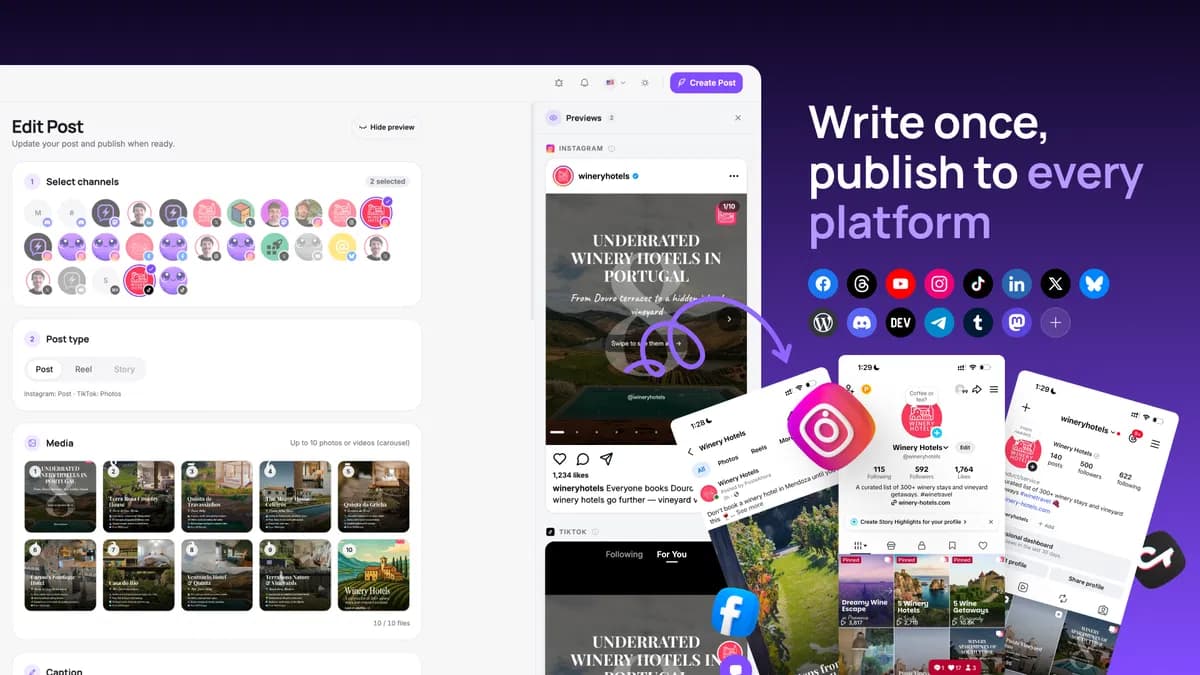
PosteAhora post composer writing one post and publishing it to 14 networks, with per-network live previews shown on desktop and mobile.
Sold out
Social media scheduling

PosteAhora

Schedule social posts and connect your publishing tools.

GOOD FORCreators with a handful of non-X profiles
Deal ended

BEFORE YOU BUY

AdaptlyPost lifetime deal FAQs

Can I publish without paying for AI?

Yes. AI generation is optional. Publishing to networks other than X does not consume the listed AI/X credits. You can write the text and supply your own media. X remains a metered exception, so include it even if you never generate a caption or image.

Can I use different times and captions for each network?

Captions and hashtags can differ by platform. The founder’s current answer says one post has one publish time: create separate posts when you need different times. This matters when one campaign targets audiences in several timezones.

Does it support recurring posts and connected threads?

Recurrence is documented, but it is not proof of an automatic evergreen queue. Thread support is unresolved: the current Create Posts API describes connected replies on X and Threads, while the support article still says connected sequences are unavailable. Confirm the exact interface, lifetime entitlement and charging behavior before relying on this feature.

Will it replace Manychat or a social inbox?

Do not buy it for that requirement today. The founder says comment-to-DM automation is not currently on the roadmap, and recent buyer feedback still describes the unified inbox as awaited. Planned delivery is not an included working feature.

Can it publish short videos automatically?

The founder confirms automatic Instagram/Facebook Reels, TikTok videos and YouTube Shorts. Audio and cover options vary: TikTok library sounds are not available through its API, while embedded audio can publish. Test your actual format rather than assuming every native-app editing option is present.

What should I test before the refund window ends?

Connect your real account types, prepare one representative campaign, verify draft permissions, and check both accepted scheduling and final publication. Include an X link if relevant, a teammate review, and the analytics you must report. Record any required feature that still needs manual work before deciding to keep the license.

Is there a free way to inspect the product first?

The vendor advertises a seven-day trial. The public signup offers Google sign-in or name, email and password. Confirm any verification, payment requirements and trial-to-lifetime conversion terms before signing up. AppSumo purchase and activation follow their own terms.

Does Tier 1 cover a daily X post with a clickable link?

A 30-day month needs 30 × 20 = 600 credits for the link posts alone. Add thirty AI captions at two credits each and the total is 660. For four connected accounts, one person and one workspace, the current result is Tier 3 · $329 once · 740 credits spare. It assumes no other chargeable actions or top-ups.

Do monthly credits roll over or multiply across workspaces?

The founder clarified on October 31 that credits belong to the account, not each workspace. Credits can be assigned to team members through one-time transfers or recurring monthly allocations. Do not multiply the tier allowance by your workspace count. Unused-credit rollover and the precise reset date remain unconfirmed.

What happens when I run out of credits?

The founder says more credits can be purchased inside the app. The API documentation says an X post retaining a clickable link fails when credits are insufficient. Top-up prices, automatic purchase behavior, retry charges and credit reversals remain unclear. Get those answers before committing to a time-sensitive campaign.

Related buying recommendations