Email marketing
Live

Utobo Email lifetime deal

The Utobo Email lifetime deal starts at $49. It can bring newsletters, cold sequences, inbox replies and application email into one workspace. Its central buying constraint is a shared sending allowance: stored contacts, connected mailboxes and monthly emails are separate limits.

STARTING PRICE

$49one-timeBuy now
Table of contents

Who is Utobo Email for?

Choose by your busiest realistic month across every email type. It is a possible fit for a small operation that can manage one pooled budget. Do not depend on a protected password-reset quota or assume that all Draper AI actions are included in the lifetime price.

Suitable for

Small teams combining campaigns and transactional email; Several brands with separate domains and shared billing; Developers needing API or SMTP sending

Consider another option if

No reserved transactional-send quota.; Draper draft/send/autopilot actions need a separate paid plan.; Brand separation does not create independent limits or billing.

Write campaigns that land in the inbox

What comes with the lifetime deal?

Monthly sending

5,000 / 10,000 / 25,000 shared sends

Lead discovery

100 B2B lead credits/month on each tier

Logs

90 days of message history

Terms

Activate within 60 days; no stacking; 60-day refund window; Plus protection as listed

PLANS AND PRICING

Utobo Email plans and pricing

Prices and allowances are shown for each plan below.

PLAN DETAILS

Compare each plan’s price and allowance. Confirm any limit marked ‘Not specified’ before buying.

Utobo Email plans and limits · USD
Plan comparison3 plansOne operator with light trafficLicense Tier 1A small team or a larger newsletterLicense Tier 2More inboxes and pooled monthly trafficLicense Tier 3
PriceUSD$49one-time$129one-time$229one-time
BillingOne-time paymentOne-time paymentOne-time payment
Users135
Workspaces111
Shared monthly sends5,000emails/month10,000emails/month25,000emails/month
Stored contacts5,000contacts10,000contacts25,000contacts
Sending domains10domains25domains50domains
Connected mailboxes3mailboxes10mailboxes25mailboxes
Sequences3sequences10sequencesUnlimitedsequences
B2B lead credits100credits/month100credits/month100credits/month
Message log retention90days90days90days
Who this tier fitsA single user whose combined messages fit the smallest pool.Up to three users with the mid-level send and mailbox allowances.A five-person operation needing the largest recorded allowance.
Keep in mindCount automated and transactional traffic; embedded-form tier eligibility needs confirmation.An extra teammate does not create another send pool.Plan paid overages before a critical sending month; operational AI remains separate.
Plan notes
  • Campaign, automation, transactional and cold-sequence sends share one monthly pool; warmup does not use it.
  • AI advice and operational AI actions have different entitlements.
  • Campaign, automation, transactional and cold-sequence sends share one monthly pool; warmup does not use it.
  • AI advice and operational AI actions have different entitlements.
  • Campaign, automation, transactional and cold-sequence sends share one monthly pool; warmup does not use it.
  • AI advice and operational AI actions have different entitlements.

Select the final tier on AppSumo. The product link opens the same listing for every tier.

Costs and limits to account for

  • No reserved transactional-send quota.
  • Draper draft/send/autopilot actions need a separate paid plan.
  • Brand separation does not create independent limits or billing.

Choose the smallest tier that covers both people and traffic

Tier 1 provides 1 user, 3 mailboxes and 5,000 sends per month. It suits one operator with modest campaign volume. Tier 2 raises the team to 3 users and the pool to 10,000. Tier 3 gives 5 users, 25 mailboxes and 25,000 sends.

A hypothetical 2,000-recipient list receiving four campaigns needs 8,000 sends before welcome sequences or password resets. Tier 1 would be too small; Tier 2 could fit only if the remaining traffic stays inside its balance. A three-person team also needs Tier 2 even if its email volume is lower. These are workload examples, not measured usage.

The monthly B2B lead allowance is the same across all three tiers. Upgrading for more mailboxes does not increase that discovery pool. Lead discovery, stored contacts, sending and mailbox warmup should each have their own line in your budget.

Transactional email has a separate path, not reserved credits

The October 29 founder answer says transactional API/SMTP messages use an immediate sending path while sharing the same monthly pool as marketing. That distinction matters: a campaign queue should not hold up a transactional request, according to the vendor, but the account still needs sending capacity.

The provider advertises a reduced-capacity degraded mode without defining its trigger, usable rate or service guarantees. The behaviour when the monthly send allowance is exhausted remains unclear. Do not plan a critical password-reset or payment workflow on that description. Reserve headroom yourself, arrange extra capacity in advance or evaluate a dedicated transactional service whose quota and failure behaviour you can validate.

The founder says warmup does not consume the campaign-send pool. That exemption should not be stretched to normal cold-sequence emails, which do consume it. Unlimited sequences on Tier 3 describe how many sequences can exist, not unlimited sending.

Additional sending can turn a lifetime purchase into a monthly bill

In an October 31 answer about Tier 3, the founder quoted roughly $0.90 per 1,000 extra messages before the AppSumo discount, or about $0.54 after a 40% discount. On that quoted basis, 25,000 additional messages would cost approximately $13.50 per month. This is a dated founder quote, not a checkout price or guaranteed entitlement on every tier.

Confirm how extra capacity is enabled, when it is billed, whether tax applies and whether the discount covers your account. Do not assume it activates automatically when your application runs out. Paid sending remains separate from the one-time licence; compare the expected recurring bill at your actual volume rather than treating a large contact cap as free distribution.

Draper advice and autonomous email actions are different purchases

The founder distinguishes free advice chat from Draper Operator or Autopilot actions that draft, send or run campaigns. Those operational plans are separate from the AppSumo lifetime offer. A product page advertising an AI agent therefore does not establish that the purchased tier includes an autonomous campaign operator. Exact paid prices and action allowances remain unconfirmed here.

The October answer says Draper can read workspace-wide information; action permissions do not restrict that reading to one list. It also says EU-only processing is not available. A team handling several clients should settle that access requirement before enabling the assistant. This is a product-scope observation, not a compliance certification.

The reported Claude MCP connection can read and draft rather than send. Do not confuse REST access, an AI writing feature and an autonomous sending permission. Budget any external assistant separately, and obtain the exact charge for optional address verification rather than assuming lead or email credits include it.

Decide whether the delivery events fit your application

The founder describes signed webhooks with message IDs and recipient information for delivered and bounced messages, along with other engagement events. Rejected and deferred messages are not separate event types in the answer. If your application needs those intermediate states, a generic webhook checkmark is insufficient.

Idempotency keys are described as valid for 24 hours. Reusing a key with the same payload returns the same send ID; a changed payload produces a conflict. Temporary failures are described as retrying with backoff over several hours, but no precise attempt count or deadline was established. Keep your own event and retry logic consistent with those documented limits rather than assuming immediate success.

FEATURE COMPARISON

Features, limits and paid extras

“Included” and “unlimited” can mean different things. This checklist separates full access, usage limits, add-ons and features that are not confirmed.

Feature coverage4 / 8

4 fully included · 1 limited · 0 add-on · 0 not included · 3 not confirmed. Coverage is not a quality score.

IncludedLimitedPaid add-onNot includedNot confirmed

Features are grouped by documented coverage. “Not confirmed” means the evidence is incomplete, not that a feature is absent.

Email marketing: documented features and conditions
FEATURESFeature comparisonUtobo EmailLifetime deal
Included4 features
Scheduled campaignsPrepare and schedule broadcasts to a contact list.
Included

Campaigns share the monthly send allowance with other email types.

Email sequencesSend follow-up messages using automated triggers.
Included

Sequences and signup-triggered welcome workflows are described by the founder.

Campaign reportingInspect delivery-related engagement such as opens and clicks.
Included

Campaign metrics and 90-day message logs are listed.

API accessConnect contact and campaign workflows to other software.
Included

REST API, SMTP and SDK access are listed; permissions require careful scoping.

Limited1 feature
Signup formsCollect subscribers through forms you can publish.
Limited

Hosted forms are described on all tiers; embedded widgets are described as higher-tier without an exact gate.

Not confirmed3 features
Landing pagesCreate a page for collecting signups or promoting content.
Not confirmed

A full standalone landing-page builder is not established for this Email offer.

RSS to emailCreate email campaigns from new feed content.
Not confirmed

Not established for this lifetime offer.

Remove vendor brandingSend without the email platform’s branding.
Not confirmed

Exact branding-removal entitlement is not established.

Check each product’s plan notes for tier limits and additional costs. Feature coverage is not a quality rating.

USE CASES

What problems does Utobo Email solve?

01

Run a newsletter without ignoring welcome-email usage

A newsletter fits the contact allowance but its campaigns and onboarding messages exhaust the sending budget.

How to use it

  1. Count actual recipients for each planned campaign.
  2. Add welcome, follow-up and application-triggered messages.
  3. Leave room for launches and unexpected transactional traffic before choosing a tier.

What this helps you do: The purchase matches outgoing volume rather than just the size of the address book.

Limitations: A stored-contact allowance is not a promise of one full-list campaign every day.

02

Send application email without maintaining another contact list

A small application needs receipts or verification emails but does not want every recipient imported into marketing lists.

How to use it

  1. Verify the sending domain and use an appropriately restricted API key or SMTP connection.
  2. Retain returned message IDs and process the supported delivery events.
  3. Use idempotency for retrying requests and monitor the shared monthly balance.

What this helps you do: The founder says API/SMTP recipients need not occupy stored-contact slots.

Limitations: These messages still use the send pool; a separate immediate path does not reserve capacity.

03

Separate brand identities while keeping a shared team inbox

A small agency handles several brands and wants different sender domains and unsubscribe behaviour.

How to use it

  1. Verify the domains and keep lists and sender identities separated.
  2. Restrict API keys by domain where appropriate.
  3. Track each brand’s consumption before a campaign spends the common allowance.

What this helps you do: The founder describes per-brand unsubscribes and domains inside one workspace.

Limitations: Billing and send limits remain shared; full isolation requires a separate workspace arrangement whose cost is not established here.

BUYER FEEDBACK

What buyers say

Buyer experiences can vary with the plan, product version and workflow.

Compare a monthly pool with SendFox’s finite lifetime pool

SendFox is a more focused candidate for a small newsletter. Its current lifetime purchase has a cumulative send pool that does not refill, whereas Utobo lists monthly renewals and includes API/SMTP use cases. Compare the total messages you expect to send over time, not just the purchase prices.

SalesBlink is a different alternative for mailbox-based cold outreach and client workspaces. Its email sender connections, AI replies and verification counters are not interchangeable with Utobo’s shared sending allowance. If all you need is a tiny newsletter, start by checking whether a free plan covers the recipients and monthly frequency before buying either product.

IncludedLimitedPaid add-onNot includedNot confirmed

Features are grouped by documented coverage. “Not confirmed” means the evidence is incomplete, not that a feature is absent.

Email marketing: documented features and conditions
FEATURESFeature comparisonUtobo EmailLifetime dealSendFoxLifetime deal
Included in every compared tool4 features
Scheduled campaignsPrepare and schedule broadcasts to a contact list.
Included

Campaigns share the monthly send allowance with other email types.

Included

Scheduled campaigns.

Email sequencesSend follow-up messages using automated triggers.
Included

Sequences and signup-triggered welcome workflows are described by the founder.

Included

Triggered sequences.

Campaign reportingInspect delivery-related engagement such as opens and clicks.
Included

Campaign metrics and 90-day message logs are listed.

Included

Opens and clicks.

API accessConnect contact and campaign workflows to other software.
Included

REST API, SMTP and SDK access are listed; permissions require careful scoping.

Included

Full API access is listed. Official pages conflict on whether MCP requires Pro; confirm assistant access before buying for it.

Where coverage differs1 feature
Signup formsCollect subscribers through forms you can publish.
Limited

Hosted forms are described on all tiers; embedded widgets are described as higher-tier without an exact gate.

Included

Signup forms.

Evidence still incomplete3 features
Landing pagesCreate a page for collecting signups or promoting content.
Not confirmed

A full standalone landing-page builder is not established for this Email offer.

Included

Hosted Smart Pages; a custom page domain requires Pro.

RSS to emailCreate email campaigns from new feed content.
Not confirmed

Not established for this lifetime offer.

Included

RSS Smart Campaigns.

Remove vendor brandingSend without the email platform’s branding.
Not confirmed

Exact branding-removal entitlement is not established.

Paid add-on

Requires the current Pro subscription. Existing Empire subscribers retain their purchased terms.

Check each product’s plan notes for tier limits and additional costs. Feature coverage is not a quality rating.

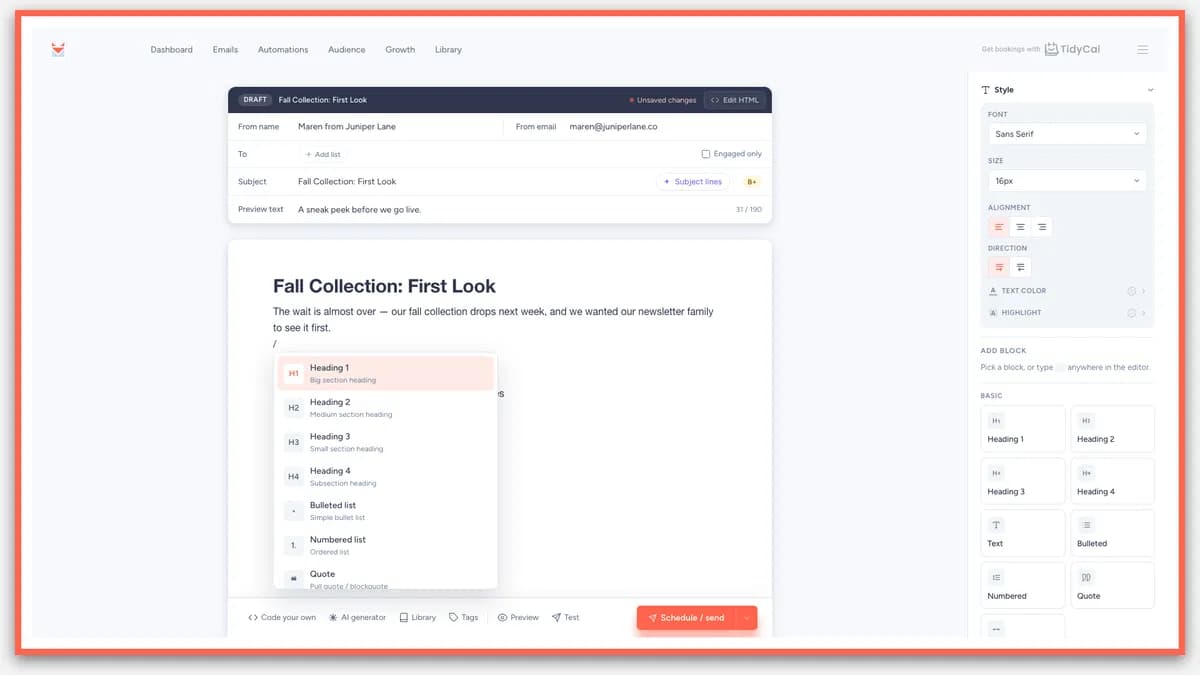
SendFox block email editor shown in the vendor’s AppSumo image.
Live
Email marketing

SendFox

Send newsletters, collect subscribers and automate welcome emails.

GOOD FORNewsletter creators
$29 / once

BEFORE YOU BUY

Utobo Email lifetime deal FAQs

Do API recipients consume contact slots?

The founder says they do not have to be stored as contacts. Their messages still consume monthly sends.

Does each sending domain get its own allowance?

No. Domain separation does not multiply the workspace’s send quota or create separate billing.

Does Tier 3 include unlimited email?

No. It lists unlimited sequences but 25,000 emails per month.

Will an AI agent run campaigns at no extra cost?

Not established. The founder separates advice chat from paid operational Draper plans.

Are password resets protected when marketing uses the entire pool?

No reserved quota is established. An immediate transactional path still shares capacity.

Related buying recommendations