Project management
Live

t0ggles lifetime deal

The current t0ggles lifetime deal starts at $24 for one internal team member. Every tier includes the same product features; the seat allowance is what changes. Guests are separate, and included task-writing AI should not be confused with the external AI tools that run through Crew.

STARTING PRICE

$24one-timeBuy now
Table of contents

Who is t0ggles for?

Choose the lowest tier that covers internal members. Do not count client guests as paid seats or buy a higher tier expecting a larger built-in AI allowance.

Suitable for

Teams that want a combined project board, client intake and AI connections without per-guest charges.

Consider another option if

Workflows requiring multiple assignees on one task, guest access to the Notes section, task event webhooks or full white-labeling.

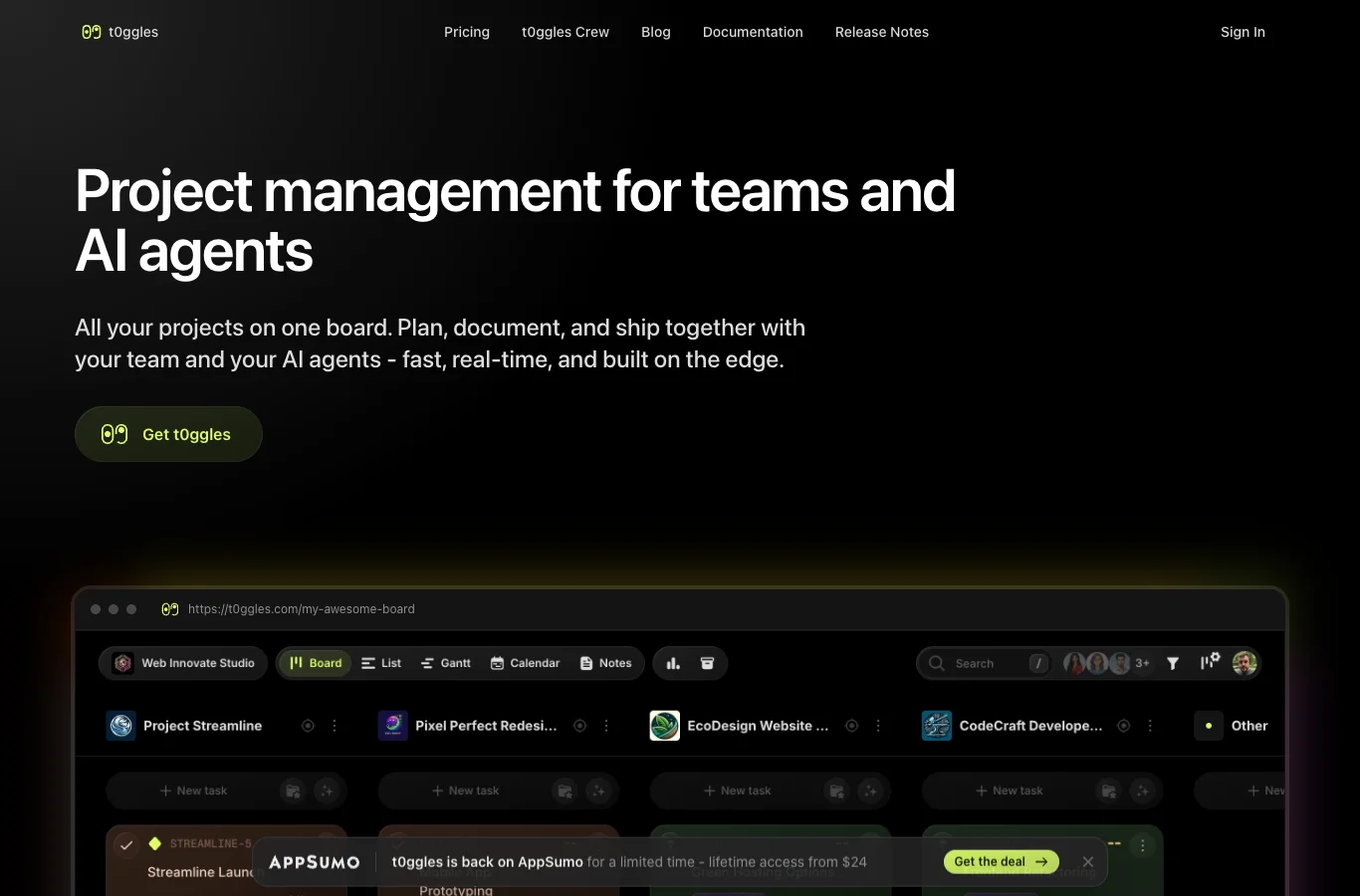
t0ggles vendor example of project tasks grouped by assignee

What comes with the lifetime deal?

Entry tier

$24 once for 1 member

Largest tier

50 members for $399

Client guests

Unlimited guests without using member seats

Built-in AI

Task generation included with no monthly limit

Activation and refunds

Activate within 60 days; listing gives a 60-day refund window

Protection

Current Radar listing excludes We Got Your Back

PLANS AND PRICING

t0ggles plans and pricing

Prices and allowances are shown for each plan below.

PLAN DETAILS

Compare each plan’s price and allowance. Confirm any limit marked ‘Not specified’ before buying.

t0ggles plans and limits · USD
Plan comparison5 plansFor one internal operatorLicense Tier 1For up to 3 internal membersLicense Tier 2For up to 10 internal membersLicense Tier 3For up to 30 internal membersLicense Tier 4For up to 50 internal membersLicense Tier 5
PriceUSD$24one-time$49one-time$139one-time$279one-time$399one-time
BillingOne-time paymentOne-time paymentOne-time paymentOne-time paymentOne-time payment
Users13103050
ProjectsUnlimitedprojectsUnlimitedprojectsUnlimitedprojectsUnlimitedprojectsUnlimitedprojects
GuestsUnlimitedguestsUnlimitedguestsUnlimitedguestsUnlimitedguestsUnlimitedguests
StorageUnlimitedGBUnlimitedGBUnlimitedGBUnlimitedGBUnlimitedGB
Maximum individual file100MB100MB100MB100MB100MB
Built-in AI actionsUnlimitedactionsUnlimitedactionsUnlimitedactionsUnlimitedactionsUnlimitedactions
Who this tier fitsA team within this member allowance; external clients can use restricted guest access.A team within this member allowance; external clients can use restricted guest access.A team within this member allowance; external clients can use restricted guest access.A team within this member allowance; external clients can use restricted guest access.A team within this member allowance; external clients can use restricted guest access.
Keep in mindSame features across tiers. Crew provider costs and guest restrictions do not disappear on a higher tier.Same features across tiers. Crew provider costs and guest restrictions do not disappear on a higher tier.Same features across tiers. Crew provider costs and guest restrictions do not disappear on a higher tier.Same features across tiers. Crew provider costs and guest restrictions do not disappear on a higher tier.Same features across tiers. Crew provider costs and guest restrictions do not disappear on a higher tier.
Plan notes
  • Same features across tiers; the team-member allowance changes.
  • Guests do not consume team seats. External AI providers for Crew are paid separately.
  • Same features across tiers; the team-member allowance changes.
  • Guests do not consume team seats. External AI providers for Crew are paid separately.
  • Same features across tiers; the team-member allowance changes.
  • Guests do not consume team seats. External AI providers for Crew are paid separately.
  • Same features across tiers; the team-member allowance changes.
  • Guests do not consume team seats. External AI providers for Crew are paid separately.
  • Same features across tiers; the team-member allowance changes.
  • Guests do not consume team seats. External AI providers for Crew are paid separately.

Select the final tier on AppSumo. The product link opens the same listing for every tier.

Costs and limits to account for

  • One task has one assignee; use subtasks for separate owners.
  • Board forms create tasks, not a new client board automatically.
  • Guest notes access, full white-labeling and task event webhooks are restricted.

Choose by internal members, not by the number of clients

Tier 1 at $24 suits one internal operator. Tier 2 at $49 covers up to 3 internal members; Tier 3 at $139 covers up to 10. Four coworkers therefore need Tier 3 even if they only have one project.

For larger teams, Tier 4 covers 30 members at $279, and Tier 5 covers 50 at $399. There is no documented feature advantage to buying above your seat requirement.

A freelancer with many client reviewers can still fit Tier 1 when those people use guest permissions. A contractor who needs ordinary team-member access belongs in the staff count. Do not count a restricted guest as a fully capable extra employee.

Included task AI and paid external agents are different

The October founder answer confirms that task generation runs on t0ggles’ side, needs no personal AI key and has no monthly limit. Official AI documentation likewise describes paid-plan AI actions as unlimited. There is no finite monthly credit balance to size or rollover allowance to calculate for that built-in workflow.

Crew is a free desktop companion that coordinates external coding agents. Its own FAQ says those providers have separate pricing and require your accounts or keys. Buying the lifetime deal does not pay an external model bill or supply an always-on computer. Budget provider usage and a machine that can run the work before planning unattended execution.

Use review checkpoints in agent pipelines for work that changes files or customer-facing output. An MCP connection makes actions possible; it does not establish that an agent will interpret every task correctly.

What clients can see, and what they cannot

Guest access can be limited to a board or a single project. The founder says guests do not consume seats, and the current offer includes unlimited guests. Choose project-level access for separate clients and verify it before sharing sensitive work.

Guests cannot open the Notes section. A single note may be shared through a public link, but that changes how the note is exposed; it is not equivalent to giving a guest private access to the whole notes area. If client documentation must remain available only to signed-in guests, test that requirement rather than relying on a public link.

Custom domains and brand colors are included, but the founder explicitly says the interface is not fully white-labelled. A domain also needs to be owned and configured. Do not sell this as a completely rebranded client platform.

Unlimited storage still has a file-size limit

The founder states unlimited storage with a 100 MB maximum for each file. A large video or design archive can exceed that limit even when total storage is unlimited. Keep oversized files in a suitable storage service and attach the project link.

Task import supports CSV, JSON and Jira XML. The documentation recognizes Trello JSON exports but excludes checklists, comments and attachments from that import. Price the manual transfer work before moving a mature board with years of discussion.

Paid report exports support CSV and PDF; task and note exports are documented separately. Downloading a report is not a full account backup. Evaluate a small representative export and restore process before treating it as your exit plan.

Four restrictions that can change the decision

Each task currently has one assignee. Split work into subtasks for distinct owners rather than assuming a higher tier adds multiple assignees. This matters when several people must independently complete the same checklist.

Board Forms can send submission webhooks; task-created or task-status webhooks are not yet supported. An incoming API connection does not mean every outgoing task event can notify another system.

The founder says the interface is English only and does not support iframe embeds in task notes. You can link a booking calendar, but you cannot assume that calendar will run inside the editor.

A reply about privacy states that the service is not end-to-end encrypted. It describes encryption in transit and at rest, which does not mean the application cannot process the content. Assess your organization’s requirements before importing confidential projects.

When the free plan is enough

The official free plan supports three members, one board, five projects, 100 tasks per board, 50 notes, 100 MB storage and 25 AI actions per month. Public sharing, MCP and Crew are available there. That gives a small team a way to check the board model before paying.

The free plan is not a substitute for the paid deal when you need private guests, larger usage or paid report exports. A solo buyer should not choose Tier 2 only because the free plan mentions three members: lifetime Tier 1 has its own 1-member limit.

For a workload that already fits free, there is no subscription bill to save. Buy for a specific paid requirement, not simply because a one-time price is lower than a crossed-out annual figure.

FEATURE COMPARISON

Features, limits and paid extras

“Included” and “unlimited” can mean different things. This checklist separates full access, usage limits, add-ons and features that are not confirmed.

Feature coverage9 / 10

9 fully included · 0 limited · 0 add-on · 0 not included · 1 not confirmed. Coverage is not a quality score.

IncludedLimitedPaid add-onNot includedNot confirmed

Features are grouped by documented coverage. “Not confirmed” means the evidence is incomplete, not that a feature is absent.

Project management: documented features and conditions
FEATURESFeature comparisont0gglesLifetime deal
Included9 features
Kanban and task listsOrganize work by status and switch to a list.
Included

Multi-project columns, Focus mode and list views.

Gantt planningSee task dates and dependencies on a timeline; read-only access is not full editing.
Included

Gantt views, dependencies, lag days and milestones.

Time trackingRecord task time with the product rather than a separate subscription.
Included

Task time logs are included in all current tiers.

Client and guest accessGive external people limited project access with documented seat rules.
Included

Unlimited guests do not consume a team seat; guests cannot access the Notes section.

Recurring tasks and rulesRepeat work or act on task conditions.
Included

Schedule-based rules and task-condition automations. Task event webhooks are not yet supported.

Built-in task AIGenerate tasks or writing inside the purchased plan.
Included

Built-in task AI has no monthly limit and does not need your own key; Crew uses separately priced external providers.

API and AI connectionsConnect supported external systems or agents to project data.
Included

REST API, MCP, GitHub sync and Zapier are listed.

Data and report exportsDownload tasks and reports, with plan-specific restrictions.
Included

Paid plans include report CSV/PDF exports; task export is documented separately.

Custom domainUse your own domain for client-facing boards.
Included

Custom board domain and colors are included, but the interface is not fully white-labelled.

Not confirmed1 feature
Client financeTrack client project finances rather than only tasks.
Not confirmed

Time reports are documented, but a client invoicing/accounting module was not established.

Check each product’s plan notes for tier limits and additional costs. Feature coverage is not a quality rating.


USE CASES

What problems does t0ggles solve?

01

See deadlines across several client projects

A separate board for each client makes it easy to miss work that collides across projects.

How to use it

  1. Create a project for each client on a shared board.
  2. Use project columns for the combined view and Focus mode when working on one client.
  3. Use assignee or due-date grouping to review work that overlaps across projects.

What this helps you do: The same task set can support a team-wide view and a focused project view.

Limitations: A shared board is not permission isolation by itself. Configure project-level guest access before inviting clients.

02

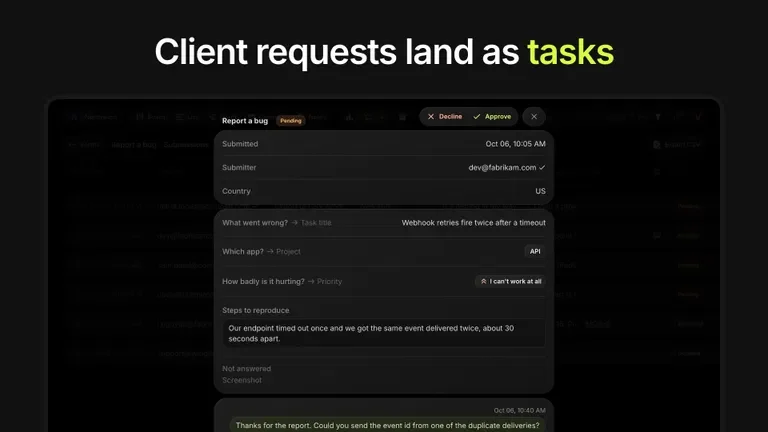
Turn client requests into tasks without copying email

Requests often arrive without a priority, project or enough detail to assign the work.

How to use it

  1. Create a Board Form with the questions needed to route the request.
  2. Map answers to task fields, then use the approval queue to review incomplete submissions.
  3. Create the client project from a saved template and invite the client only to that project.

What this helps you do: Requests arrive with context attached to a task, ready for an owner to review.

Limitations: The form does not automatically create a new board. A client-onboarding process still needs the documented project-template step or a separately designed integration.

03

Prepare task drafts without buying a separate AI writer

A short project brief needs to become tasks with useful owners, dates and acceptance details.

How to use it

  1. Describe the work and provide deadlines and assignment details to the built-in AI task tool.
  2. Review each generated task for invented requirements and wrong dates.
  3. Edit or delete suggestions before adding them to the board.

What this helps you do: The AI produces a draft task list a person can approve.

Limitations: No monthly limit is stated for included task AI, but generated tasks still need an accuracy review. External agents through MCP are a different billing path.

BUYER FEEDBACK

What buyers say

Buyer experiences can vary with the plan, product version and workflow.

t0ggles or Worklenz for a small agency?

For three internal members plus client reviewers, t0ggles Tier 2 costs $49 and includes the documented guest and automation features. Worklenz one code at $79 covers more staff, but its Business client-finance features are a separate gate.

For five internal members who mainly need task worklogs, Worklenz one code costs $79, while t0ggles requires Tier 3 at $139. Prefer t0ggles when included forms, project guests, custom board domains or API/MCP access are central to delivery. Prefer a confirmed Worklenz Business arrangement when project finance is the real requirement.

These are different working methods, not a universal winner. Check workflow reliability, migration completeness and accounting requirements before switching.

IncludedLimitedPaid add-onNot includedNot confirmed

Features are grouped by documented coverage. “Not confirmed” means the evidence is incomplete, not that a feature is absent.

Project management: documented features and conditions
FEATURESFeature comparisont0gglesLifetime dealWorklenzLifetime deal
Included in every compared tool3 features
Kanban and task listsOrganize work by status and switch to a list.
Included

Multi-project columns, Focus mode and list views.

Included

List and Kanban task management are part of the offer.

Time trackingRecord task time with the product rather than a separate subscription.
Included

Task time logs are included in all current tiers.

Included

Automatic timer and manual time entries are advertised on the deal.

Recurring tasks and rulesRepeat work or act on task conditions.
Included

Schedule-based rules and task-condition automations. Task event webhooks are not yet supported.

Included

Founder says recurring tasks are included in all AppSumo purchases despite the standard Business label.

Where coverage differs5 features
Gantt planningSee task dates and dependencies on a timeline; read-only access is not full editing.
Included

Gantt views, dependencies, lag days and milestones.

Limited

Pro comparison lists read-only Gantt; the founder identifies full Gantt with five-code Business.

Client and guest accessGive external people limited project access with documented seat rules.
Included

Unlimited guests do not consume a team seat; guests cannot access the Notes section.

Limited

Official Pro pricing lists five guests, Business unlimited; confirm the quota on a redeemed lifetime workspace. Guests can comment and attach files within one project.

API and AI connectionsConnect supported external systems or agents to project data.
Included

REST API, MCP, GitHub sync and Zapier are listed.

Not included

October founder answer says public API and MCP are being developed; Make and Zapier have no direct connection.

Data and report exportsDownload tasks and reports, with plan-specific restrictions.
Included

Paid plans include report CSV/PDF exports; task export is documented separately.

Limited

Task CSV/comments/files export is documented; finance Excel export requires Business or an eligible higher plan.

Custom domainUse your own domain for client-facing boards.
Included

Custom board domain and colors are included, but the interface is not fully white-labelled.

Not included

Founder explicitly excludes cloud CNAME and full white-labeling even from five-code Business.

Evidence still incomplete2 features
Built-in task AIGenerate tasks or writing inside the purchased plan.
Included

Built-in task AI has no monthly limit and does not need your own key; Crew uses separately priced external providers.

Not confirmed

Founder describes future credit-based AI. No current allowance, reset schedule or top-up price was established.

Client financeTrack client project finances rather than only tasks.
Not confirmed

Time reports are documented, but a client invoicing/accounting module was not established.

Limited

Founder includes finance and client portal at five codes; the formal listing names Pro.

Check each product’s plan notes for tier limits and additional costs. Feature coverage is not a quality rating.

Worklenz vendor example of task list and Kanban views
Live
Project management

Worklenz

Organize project tasks and track your team’s time.

GOOD FORTeams that need task-level time logs beside their project work
$79 / once

BEFORE YOU BUY

t0ggles lifetime deal FAQs

Is this the same offer as the old t0ggles lifetime deal?

No. The current offer has five tiers and a listing address ending in t0ggles-7ca85bd9. Older four-tier prices and guarantee wording should not be applied to it.

Do guests consume seats?

The founder says guests do not consume team seats and are unlimited on all current tiers. Guest permissions are more restricted than internal-member access.

Do I need an API key for AI task creation?

No personal key is needed for the built-in task generation described in the current Q&A. External agents connected through Crew or MCP have their own account and provider requirements.

Can a form create a new client board automatically?

Not through the native form workflow described by the founder. A submission creates a task; a client project can then be created from a saved template.

Can I upgrade later?

The deal terms allow moving between five tiers, and the vendor says upgrades are possible while the offer is live. Do not plan on an unlimited upgrade window after the sale closes.

Is We Got Your Back included?

The current Radar listing says it is not. The listing separately states a 60-day refund period.

Related buying recommendations