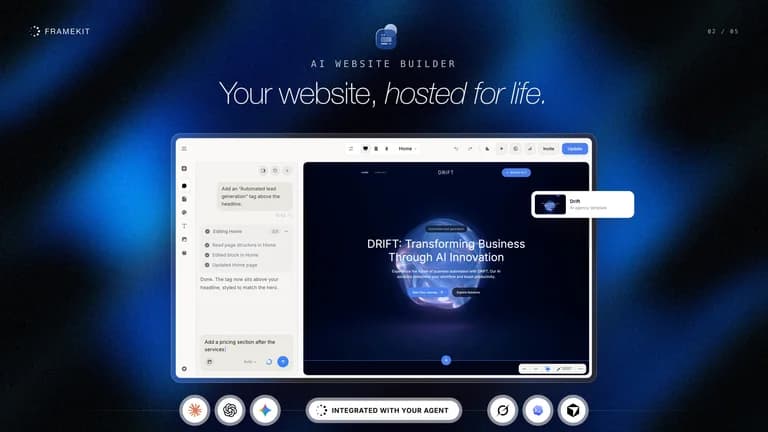
The Framekit lifetime deal starts at $99 for one hosted website, 600 one-time AI credits and shared media storage. It combines portfolio sites, client galleries, video review and digital sales, but its store-fee wording needs clarification before a revenue forecast.
Framekit is most compelling for a photographer or filmmaker replacing several client-delivery tools with one hosted workspace. Tier 1 is enough for one portfolio when shared storage fits. Tier 2 adds sites but not more storage; Tier 3 is mainly a capacity decision. Resolve store-fee and blog-state questions before making sales or publishing plans around them.
Suitable for
Photographers delivering client galleries; Filmmakers collecting timecoded review comments; Creators selling digital files alongside a portfolio
Consider another option if
AI credits are one-time, not monthly; Storage is shared across all sites; Tier 3 zero-fee wording conflicts with a founder reply
What comes with the lifetime deal?
AI credits
One-time
Storage
Shared account pool
Sales fees
Tier 3 conflict remains
Client uploads
No general upload portal
PLANS AND PRICING
Framekit plans and pricing
Prices and allowances are shown for each plan below.
PLAN DETAILS
Compare each plan’s price and allowance. Confirm any limit marked ‘Not specified’ before buying.
Framekit plans and limits · USD
Plan comparison3 plans
Tier 1 (Pro)
Tier 2 (Pro)
Tier 3 (Business)
PriceUSD
$99one-time
$199one-time
$399one-time
Billing
One-time payment
One-time payment
One-time payment
Website slots
1sites
5sites
15sites
One-time AI credits
600credits
2,000credits
4,500credits
Shared storage
300GB
300GB
2,000GB
Who this tier fits
One portfolio and its client-delivery assets.
Several sites sharing the same 300 GB storage pool.
Larger media workload across up to 15 sites;2 TB advertised storage.
Keep in mind
External AI usage, domains and payment processing can cost extra.
External AI usage, domains and payment processing can cost extra.
External AI usage, domains and payment processing can cost extra.
Plan notes
One portfolio and its client-delivery assets.
External AI usage, domains and payment processing can cost extra.
Several sites sharing the same 300 GB storage pool.
External AI usage, domains and payment processing can cost extra.
Larger media workload across up to 15 sites;2 TB advertised storage.
External AI usage, domains and payment processing can cost extra.
Select the final tier on AppSumo. The product link opens the same listing for every tier.
Tier 3 zero-fee wording conflicts with a founder reply
Count sites and media separately
Tier 1 costs $99 for one site, six hundred one-time AI credits and three hundred gigabytes of storage. Tier 2 costs $199 for five sites and two thousand credits, but its storage remains three hundred gigabytes. Buying five sites does not create five separate storage pools.
Tier 3 costs $399 for fifteen sites, four thousand five hundred credits and two terabytes of storage. The founder confirms storage is shared across the account and cannot currently be partitioned into an allowance for each site. An agency should therefore decide who monitors heavy uploads and client archives.
Estimate media already delivered as well as the public portfolio. Galleries and video versions can consume much more space than website text. Fifteen available site slots are not useful if the media workload exceeds the account’s capacity. No compression ratio or storage-overage price is assumed here.
One-time credits fund a finite amount of building
The plan labels explicitly say AI credits are one-time. They are not replenished every month. Use a clear initial brief and review small sections before repeatedly regenerating an entire site; the useful measure is completed, accepted work rather than the number of prompts sent.
The expanded feature list includes own OpenAI or Gemini keys and agent access through MCP. That provides another route to AI work, but your chosen provider or assistant can charge separately. “Unlimited with your own key” does not mean the model provider supplies free usage.
A founder question about the price of extra credits was not fully resolved in the visible reply, which answered shared storage. Do not quote a guessed top-up price. A creator expecting continuous AI redesign should confirm the current purchase screen and the exact BYOK workflow before budgeting.
Galleries and video review solve different handoff problems
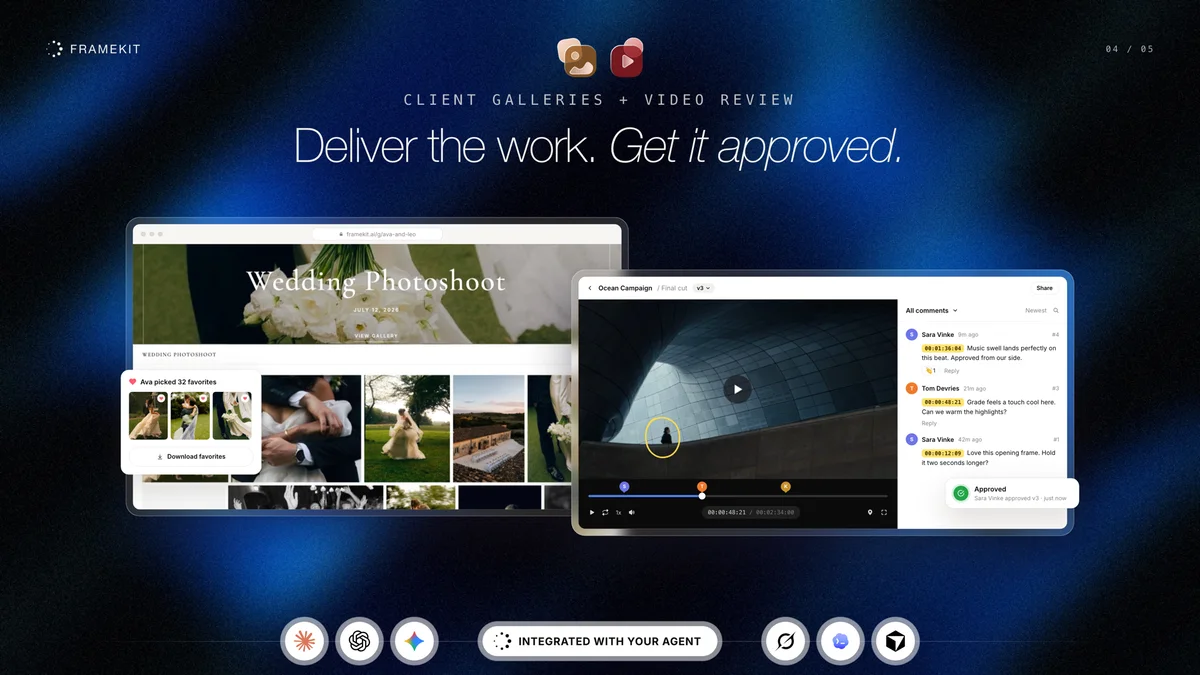
For photographs, create a gallery, choose access settings and let the client mark favorites or download the delivered files. For a video edit, share the review link so comments attach to a precise moment; version comparison and approval are advertised. This can reduce vague email feedback when the client uses the intended workflow.
The October 30 founder answer says per-photo purchasing that removes a watermark is not supported. A gallery’s favorites are therefore a selection workflow, not automatically a paid proofing cart. The store can sell digital packs, but that is a different transaction model.
There is no general client upload link in the same answer. Video-review comments can include small attachments, stated as up to ten megabytes each. Do not buy Framekit to replace a large incoming-file transfer portal unless that separate requirement is confirmed.
Resolve the Tier 3 fee conflict before forecasting sales
The plan table lists zero platform fees only on Tier 3. The October 30 founder reply instead says five percent on Tiers 1/2 and one percent on Tier 3, plus Stripe processing. The lower tiers therefore clearly should not be sold as zero-fee; Tier 3 remains a genuine contradiction.
At an illustrative one thousand dollars of monthly store sales, five percent would be fifty dollars before processing. A one-percent fee would be ten dollars, while zero percent would be none. These are arithmetic examples using conflicting stated policies, not a forecast of your sales or a confirmed Tier 3 charge.
Get the applicable fee in writing before moving a catalogue or promising client margins. A digital checkout also needs an actual payment-provider connection and appropriate product delivery settings. The licence is not evidence that a customer purchase has been completed successfully.
Confirm editorial and exit requirements early
An October 29 founder reply says the blog manager is being reworked and does not give an ETA. A buyer’s updated comment the following day says a Posts interface is live. Those observations are close in time but not equivalent to a stable, documented publishing contract. Evaluate the actual account workflow if a regular blog is central to the site.
Per-page SEO titles and descriptions are confirmed in the founder response. That does not establish every advanced CMS feature, collection template or redirect control. A large existing publication should check its URL and content migration requirements before choosing a portfolio-oriented builder.
The published information does not establish portable source-code export for the whole website. Keep original media, copy and domain ownership separate from the hosted builder. PDF deck export and media downloads should not be confused with an independently deployable website.
Choose a creative delivery suite for the right workload
For one simple portfolio, the vendor advertises a free plan and existing static-page tools may be sufficient. Framekit becomes more persuasive when photo selection, video feedback, a portfolio and digital sales belong in one customer journey. It is less compelling if you only need a single link page.
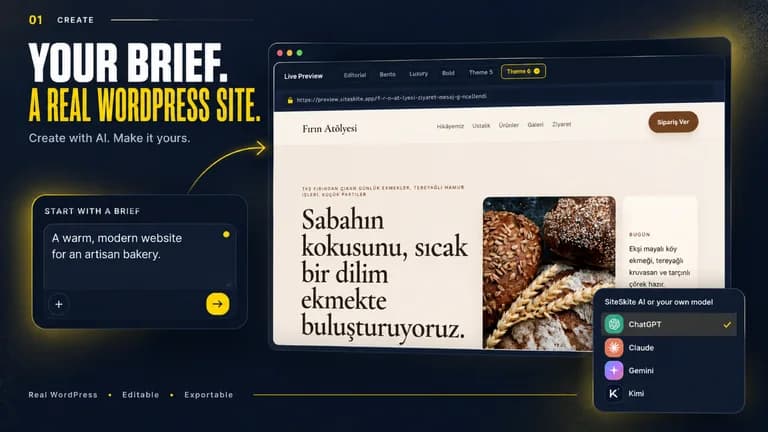
SiteSkite solves a different problem: maintaining and building WordPress sites on your own hosting. Choose it for WordPress operations and portability, while accounting for hosting and AI limits. Framekit is the hosted creative-suite choice, with greater dependence on its platform.
The offer requires activation within sixty days and allows movement among three tiers without code stacking. Only one current AppSumo review was visible; it describes a very recent photographer/video use case. That small, early sample cannot establish long-term reliability.
FEATURE COMPARISON
Features, limits and paid extras
“Included” and “unlimited” can mean different things. This checklist separates full access, usage limits, add-ons and features that are not confirmed.
Feature coverage4 / 8
4 fully included · 2 limited · 0 add-on · 0 not included · 2 not confirmed. Coverage is not a quality score.
Features are grouped by documented coverage. “Not confirmed” means the evidence is incomplete, not that a feature is absent.
Website builders: documented features and conditions
FEATURESFeature comparison
FramekitLifetime deal
Included4 features
Website creationBuild and edit the intended website type.
Included
Hosted visual and AI website building.
Domain and brandingDistinguish public-site domains from agency demo/report branding.
Included
Paid sites can use custom domains.
Production hostingIdentify which infrastructure is included.
Included
Hosting, SSL and CDN listed in paid plans.
Client deliverySupport the relevant gallery, review or reporting workflow.
Included
Photo galleries and video feedback; no general client upload or per-photo checkout.
Limited2 features
AI buildingUnderstand credit resets and external model bills.
Limited
Finite one-time credits; own-provider model use can incur external charges.
Digital salesCheck payment connections and transaction charges.
Limited
Digital-product store; tier fees and Stripe charges require attention.
Not confirmed2 features
Portable outputExport a deployable website rather than only media or data.
Not confirmed
Portable website source-code export not established.
Site maintenanceManage updates, backups and recovery.
Not confirmed
Not established as a manager for externally hosted WordPress sites.
Check each product’s plan notes for tier limits and additional costs. Feature coverage is not a quality rating.
USE CASES
What problems does Framekit solve?
01
Collect useful video feedback
A filmmaker receives vague change requests over email.
How to use it
Upload an edit and choose the client review access.
Ask the client to comment at the relevant moment.
Compare the revised version and record approval.
What this helps you do: Comments can be tied to a specific part of the work.
Limitations: This does not provide a general large-file client upload portal.
02
Deliver a photo selection
A photographer needs clients to choose final images.
How to use it
Create a gallery and set access permissions.
Ask the client to mark favorites.
Deliver the selected files through the supported download workflow.
What this helps you do: Selection and delivery can stay beside the portfolio.
Limitations: Per-photo purchase and automatic paid watermark removal are not supported in the founder answer.
BUYER FEEDBACK
What buyers say
Buyer experiences can vary with the plan, product version and workflow.
Mixed feedback
Very early creative-workflow feedback
One visible current review describes a purchase the previous day and enthusiasm for photographer/video workflows. It is too small and early a sample to infer long-term reliability; founder questions provide more useful limits on galleries, uploads and storage.