The Consently lifetime deal starts at $39 for one website. Choose it by domains, traffic and the consent integrations you can verify, rather than assuming a purchased banner automatically settles every privacy requirement.
Consently is a practical consent-management option for site owners who can install and verify its script. Tier 1 suits one modest-traffic domain; Tier 2 removes the listed pageview cap and covers five domains. It can help implement consent choices, but a banner or policy template alone does not establish that a business meets every legal obligation.
Suitable for
Site owners managing consent scripts; Agencies maintaining several websites; Teams willing to verify actual tag behavior
Consider another option if
A banner does not establish complete legal compliance.; Tier 1 has a100,000 monthly-pageview cap.; Google certification programmes have different statuses.
What comes with the lifetime deal?
Purchase
One-time licence; listed limits still apply
Main decision
A banner does not establish complete legal compliance.
PLANS AND PRICING
Consently plans and pricing
Prices and allowances are shown for each plan below.
PLAN DETAILS
Compare each plan’s price and allowance. Confirm any limit marked ‘Not specified’ before buying.
Consently plans and limits · USD
Plan comparison6 plans
One modest-traffic siteLicense Tier 1
Up to five sites or higher trafficLicense Tier 2
Six to ten domainsLicense Tier 3
Eleven to twenty-five domainsLicense Tier 4
Twenty-six to fifty domainsLicense Tier 5
More than fifty domainsLicense Tier 6
PriceUSD
$39one-time
$129one-time
$249one-time
$449one-time
$699one-time
$999one-time
Billing
One-time payment
One-time payment
One-time payment
One-time payment
One-time payment
One-time payment
Domains
1domains
5domains
10domains
25domains
50domains
Unlimiteddomains
Total monthly pageviews
100,000pageviews/month
Unlimitedpageviews/month
Unlimitedpageviews/month
Unlimitedpageviews/month
Unlimitedpageviews/month
Unlimitedpageviews/month
Who this tier fits
One domain within 100,000 monthly pageviews.
Five domains with no listed pageview cap.
A small client portfolio.
A growing maintenance portfolio.
A larger fixed site portfolio.
A high-volume site operation.
Keep in mind
Traffic cap and branding entitlement.
Confirm subdomain/staging counting.
Each site still needs tag checks.
Keep client handover responsibilities explicit.
Capacity does not prove independent client logins.
Unlimited domains do not remove implementation obligations.
Plan notes
Premium plan updates; activation within 60 days.
Domain counting and consent implementation should be checked for the actual site.
Premium plan updates; activation within 60 days.
Domain counting and consent implementation should be checked for the actual site.
Premium plan updates; activation within 60 days.
Domain counting and consent implementation should be checked for the actual site.
Premium plan updates; activation within 60 days.
Domain counting and consent implementation should be checked for the actual site.
Premium plan updates; activation within 60 days.
Domain counting and consent implementation should be checked for the actual site.
Premium plan updates; activation within 60 days.
Domain counting and consent implementation should be checked for the actual site.
Select the final tier on AppSumo. The product link opens the same listing for every tier.
A banner does not establish complete legal compliance.
Tier 1 has a100,000 monthly-pageview cap.
Google certification programmes have different statuses.
Domain count and pageview limits
Tier 1 covers one domain and 100,000 total pageviews per month. Tier 2 covers five domains and removes the listed monthly pageview cap. Tiers 3, 4 and 5 cover ten, twenty-five and fifty domains, while Tier 6 lists unlimited domains. These are website allowances, not staff seats or a promise of independent client billing accounts.
A single site that regularly exceeds 100,000 monthly pageviews can justify Tier 2 even without a second domain. Conversely, a small agency with six client domains needs Tier 3 even if their combined traffic is low. Count the actual domains and clarify treatment of subdomains, staging copies and replacement sites before choosing capacity.
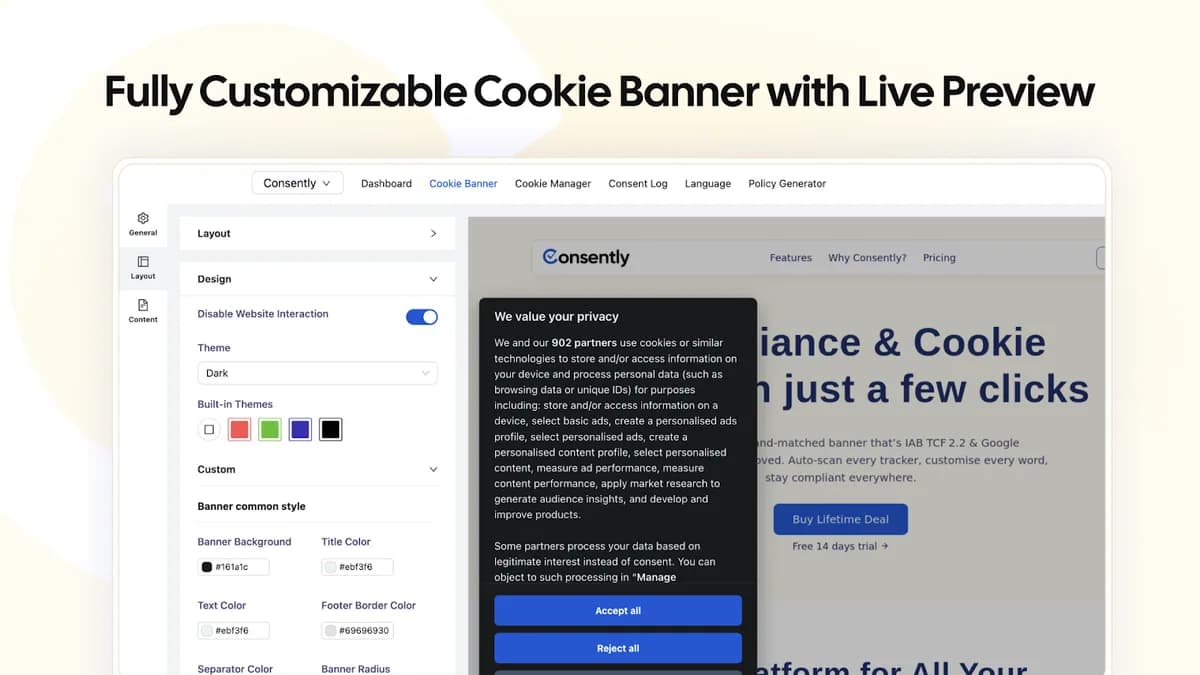
The deal maps all six tiers to Premium updates, with upgrades while the offer is available and downgrades within sixty days. Activation and the refund window are also sixty days. The common feature set includes banner customization, cookie scanning, policies and consent logs; higher tiers primarily address capacity and branding scope rather than replacing implementation work.
The consent signal must arrive before the tag
A useful setup begins with an inventory of scripts that collect data: analytics, ads, embedded media and other third parties. Install Consently through the documented direct-script or tag-manager method, then check the initial state before a visitor makes a choice. A banner can look correct while a separately installed tracking script has already run.
The vendor’s timing guide distinguishes early consent initialization from later updates and discusses debugging late consent. Use the appropriate Google Tag Assistant and browser network inspection to check a fresh visit, acceptance, rejection and a changed preference. Repeat on the pages and templates that actually load different tags, rather than testing only the homepage.
Consent Mode support is a technical capability, not automatic approval of every analytics configuration. The choice between basic and advanced behavior and the treatment of cookieless signals must fit the organization’s requirements. A plugin alone cannot establish a site’s legal compliance.
Read the specific certification scope
Consently says in its dedicated documentation that it is certified for Google Additional Consent v 2 and supports IAB TCF v 2.3 and Google Consent Mode v 2. It separately states that the Google CMP Partner listing is pending approval. That distinction is narrower than a general claim that every Google certification or partner programme is complete. Confirm the current certification and programme status directly before relying on it.
The AppSumo marketing uses broader Google-certified wording and refers elsewhere to an older TCF version. For a publisher whose advertising platform requires a particular certified CMP status, verify that exact programme and integration before replacing the current solution. Do not use a generic certification badge as a substitute for the platform’s specific requirement.
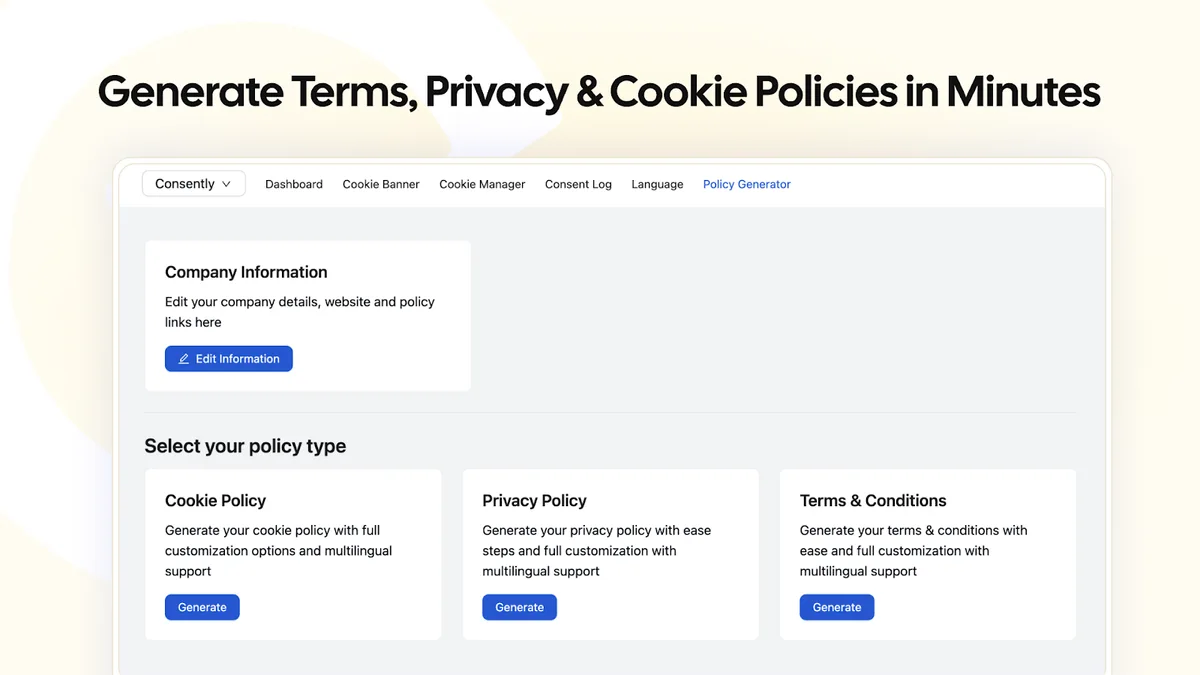
Policy generation is likewise a starting point. Confirm the business identity, actual processing activities, providers, retention choices and contact details in the resulting text. A template cannot know a private workflow that has never been entered into the system. Material legal requirements should be reviewed for the business and jurisdiction concerned.
Scanning is a maintenance aid, not a one-time finish
The offer includes scheduled weekly scanning and cookie categorization. Review scan changes after adding a new analytics tool, chat widget or video embed. An automatically detected cookie can still require a correct purpose and category, and an unknown script must not be assumed harmless simply because it was not recognized.
Test the preference-revisit control after a visitor has made a choice. One buyer reported different behavior between banner layouts, while the founder said it could not reproduce the issue and requested the affected site. That disagreement is unresolved evidence, not proof of a universal defect or a confirmed fix. It makes the revisit path an important acceptance check.
For client offboarding, the founder says removing the website from the Consently dashboard stops its banner while leaving the installed script inactive. Agree who will replace the consent system before removing access. An inactive script is not a safe handover if the client assumes consent handling still works.
FEATURE COMPARISON
Features, limits and paid extras
“Included” and “unlimited” can mean different things. This checklist separates full access, usage limits, add-ons and features that are not confirmed.
Feature coverage1 / 8
1 fully included · 4 limited · 0 add-on · 2 not included · 1 not confirmed. Coverage is not a quality score.
Logs and administrative evidenceLogs and administrative evidence with product-specific scope and plan limits.
Limited
Consent records and scan reports; not a legal compliance guarantee.
Not included2 features
VPN connectionVPN connection with product-specific scope and plan limits.
Not included
Not a VPN service.
Password vaultPassword vault with product-specific scope and plan limits.
Not included
Not a password manager.
Not confirmed1 feature
Team sharing and permissionsTeam sharing and permissions with product-specific scope and plan limits.
Not confirmed
Multi-site management; staff permission entitlements not established.
Check each product’s plan notes for tier limits and additional costs. Feature coverage is not a quality rating.
USE CASES
What problems does Consently solve?
01
Bring a website’s consent choices into one place
Several tracking scripts and a separate policy page are maintained inconsistently.
How to use it
Inventory the scripts and purposes.
Install the documented consent integration.
Check fresh visit, reject, accept and revisit behavior.
What this helps you do: The site can offer and record a consistent preference workflow.
Limitations: Actual tag timing and legal requirements still need verification.
02
Maintain several client banners
Each client site has different tags and traffic.
How to use it
Count domains and pageviews.
Configure each site’s actual scripts and policies.
Record handover responsibilities before removing a domain.
What this helps you do: A shared dashboard can simplify repeated administration.
Limitations: Deleting a site disables its banner; replacement must be planned.
BUYER FEEDBACK
What buyers say
Buyer experiences can vary with the plan, product version and workflow.
Mixed feedback
Implementation quality needs checking
Positive reports about setup/support sit alongside criticism of terms generation and banner behavior. A question about the revisit control has a buyer/founder disagreement, so no universal defect or resolved-fix claim is made.
Consently images
Compare implementation quality as well as licence cost
An existing free consent tool may be sufficient for a small site if it supports the actual tags, jurisdictional needs and visitor preference changes. Replacing a working setup solely for a lifetime price can create more work than it saves. For complex publishers, compare a provider’s exact required certification and tag support before domain capacity.
Consently is not a VPN or a password manager. Those products protect different parts of a workflow and cannot replace the site’s consent mechanism. For an agency, the useful comparison is whether staff can consistently install, document and maintain the same consent behavior across client sites.
Buyer reviews include praise for support and usability alongside criticism of generated terms and banner behavior. Keep copies of the approved policies and the implementation checks. The buying decision should end with demonstrated accept, reject and revisit behavior on the site—not merely a purchased licence or a visually attractive banner.
No. It lists 100,000 total monthly pageviews. Tier 2 and above list unlimited pageviews.
Does a banner guarantee GDPR compliance?
No. Correct consent behavior, policies and the underlying processing practices all matter.
Is the Google CMP Partner listing complete?
Consently’s dedicated documentation says the CMP Partner listing is pending and describes Additional Consent v2 certification as current. Verify the exact programme your use requires.
What happens if I remove a client domain?
The founder says the banner stops appearing and the installed script remains inactive until removed or replaced.