The WP Reset Pro lifetime deal starts at $49 for five plugin sites and five cloud-site slots. Its value is repeatable WordPress development and recovery work, with database snapshots kept separate from complete file backups.
WP Reset Pro is useful for developers who repeatedly test, reset and recover WordPress environments. Buy by active plugin sites and separate cloud slots. Its snapshots are primarily database checkpoints, so it should complement an independent file-and-database backup rather than replace one.
Suitable for
WordPress developers testing changes; Agencies maintaining defined recovery routines; Teams using independent backups alongside checkpoints
Consider another option if
Database snapshots are not complete file backups.; Cloud-site slots differ from plugin-site licences.; Each cloud-site allocation remains3GB.
What comes with the lifetime deal?
Purchase
One-time licence; listed limits still apply
Main decision
Database snapshots are not complete file backups.
PLANS AND PRICING
WP Reset Pro plans and pricing
Prices and allowances are shown for each plan below.
PLAN DETAILS
Compare each plan’s price and allowance. Confirm any limit marked ‘Not specified’ before buying.
WP Reset Pro plans and limits · USD
Plan comparison4 plans
Up to five sitesLicense Tier 1
Up to fifty plugin sitesLicense Tier 2
Unlimited plugin activationsLicense Tier 3
More cloud-site capacityLicense Tier 4
PriceUSD
$49one-time
$129one-time
$299one-time
$499one-time
Billing
One-time payment
One-time payment
One-time payment
One-time payment
Plugin site licences
5sites
50sites
Unlimitedsites
Unlimitedsites
WP Reset Cloud site licences
5sites
15sites
30sites
60sites
Storage per cloud site licence
3GB/site
3GB/site
3GB/site
3GB/site
Who this tier fits
A freelancer or small test portfolio.
An agency with a larger activation pool.
A larger development or client portfolio.
A portfolio needing up to sixty cloud slots.
Keep in mind
No remote actions, full rebranding or staging; independent backup still needed.
Fifteen cloud sites; no full rebranding or staging.
Only thirty cloud sites; no unlimited per-site storage.
Same 3GB per cloud site.
Plan notes
Cloud slots are separate from plugin site licences.
Snapshots do not replace a complete independent backup.
White label included; no remote actions/stats; no full rebranding or staging.
Cloud slots are separate from plugin site licences.
Snapshots do not replace a complete independent backup.
White label included; remote actions/stats included; no full rebranding or staging.
Cloud slots are separate from plugin site licences.
Snapshots do not replace a complete independent backup.
White label included; remote actions/stats included; full rebranding and staging included.
Cloud slots are separate from plugin site licences.
Snapshots do not replace a complete independent backup.
White label included; remote actions/stats included; full rebranding and staging included.
Select the final tier on AppSumo. The product link opens the same listing for every tier.
Cloud-site slots differ from plugin-site licences.
Each cloud-site allocation remains3GB.
Plugin sites and cloud slots are different
Tier 1 covers five plugin sites and five WP Reset Cloud site licences. Tier 2 covers fifty plugin sites but only fifteen cloud sites. Tiers 3 and 4 allow unlimited plugin sites with thirty and sixty cloud sites respectively. Each cloud site licence has a three-gigabyte storage allocation.
An agency with forty client sites may fit Tier 2 for plugin activation while exceeding its cloud-site allowance if it wants every site stored in WP Reset Cloud. Unlimited plugin sites on Tier 3 does not turn thirty cloud slots into unlimited cloud storage. Count both dimensions before choosing a tier.
Licences can be moved after deactivation according to the FAQ. White labeling is included on every tier, remote actions and statistics start at Tier 2, and full rebranding plus staging start at Tier 3. Choose for a required feature before simply counting active sites.
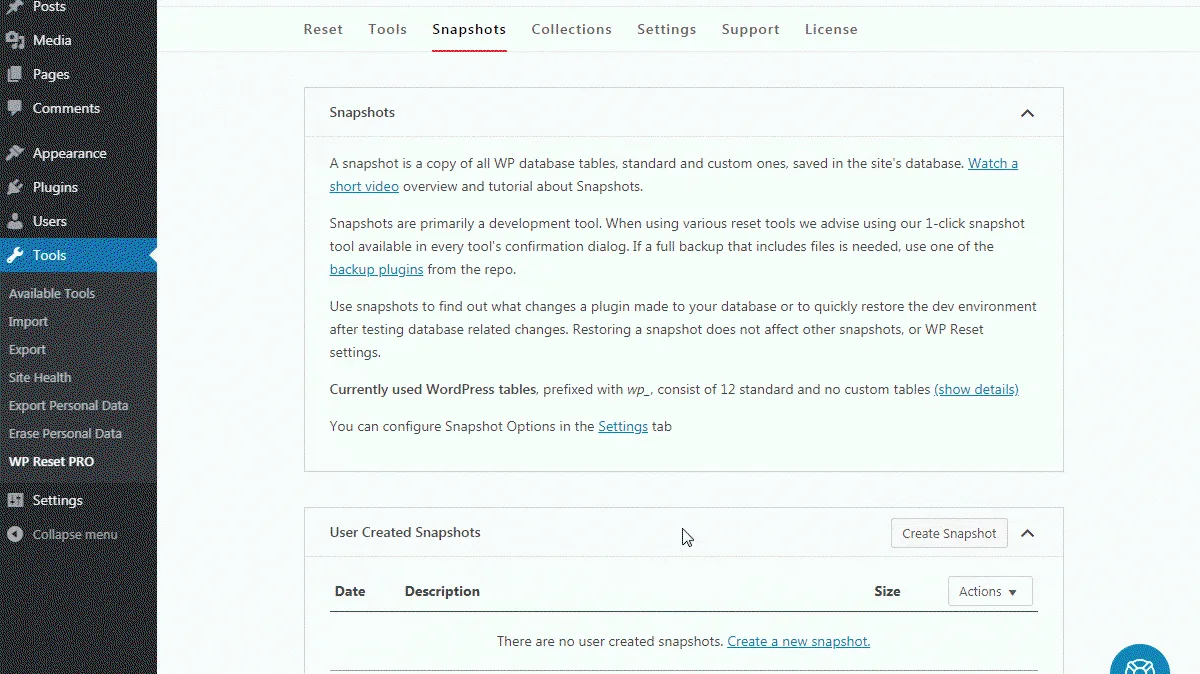
A snapshot is primarily a database checkpoint
The dedicated restore documentation describes replacing WordPress database tables with their snapshot versions. Founder answers clarify that snapshots are not complete backups of media, themes and plugins. Restoring the database after a theme update does not automatically reinstall the old theme files.
This distinction matters when a change affects both files and data. A database checkpoint may restore settings or content while the updated plugin code remains on disk. Keep an independent backup that can recover the required files as well as the database, and know where its restore controls are before making a risky change.
For a live shop, restoring an old database can also remove newer orders, customer changes or other records written after the checkpoint. A fast restore is not automatically the correct recovery choice. Decide which data must be preserved and use a controlled recovery process rather than treating every problem as a reason to roll the whole database backward.
Use resets and collections on a controlled environment
A developer can start from a disposable WordPress installation, create a checkpoint, install a known collection of plugins and themes, then test one change at a time. After each test, compare the result and return to the intended baseline. That is a more defensible workflow than experimenting directly on a customer’s production database.
Collections organize installation steps, but they do not grant licences to third-party premium plugins or themes. Retain valid downloads and licences for each paid component. A repeatable installation should also include configuration checks; simply activating the same plugin names does not recreate every integration or secret setting.
Reset and cleanup tools have different scopes. A selective cleanup can remove particular records, while broader reset options can remove much more. Read the selected operation and confirm the target environment before running it.
Storage limits apply to the database you actually have
One critical buyer review describes a snapshot larger than the three-gigabyte cloud-site cap and local storage pressure. That is an individual report, but it highlights a real sizing question: measure the snapshot/database footprint rather than the size of the public media folder alone.
The FAQ describes controlling when snapshots are made and deleting local copies after cloud upload. Set retention deliberately and verify that a remote copy can be restored before relying on it. Keeping many checkpoints in the same database or hosting account can consume the very storage needed to recover from a failure.
External storage integrations may offer another route, but their own storage allowances, credentials and charges remain separate. Do not interpret cloud integration as free unlimited storage with Dropbox, Google Drive, pCloud or another provider. If a site exceeds the documented limit, obtain a supported storage plan before making it part of the routine.
Prepare emergency access before it is needed
The Emergency Recovery Script is intended to help when WordPress administration is unavailable. Understand its installation and access requirements while the site works, and keep the relevant recovery information secure. A recovery utility is not a promise that every malware incident or hosting outage can be fixed from the same server.
The current founder update describes staging in a subfolder with sufficient hosting space, while older answers refer to cloud sandbox behavior. Those descriptions should not be silently combined into one universal hosting promise. Confirm the actual staging mode, resource needs and isolation before using it with client data.
For a simple disposable test site, the free WP Reset plugin or a fresh local WordPress installation may be enough. Pro becomes useful for repeated checkpoints, collections and broader recovery administration. Keep the host’s or another independent backup system: the vendor itself says WP Reset works alongside conventional backup tools.
Evaluate a representative recovery path
The offer includes future Pro updates, no stacking and activation within sixty days. It lists four current tiers, although a terms line still mentions movement between three tiers; clarify an intended upgrade or downgrade rather than relying on that stale count. Previous AppSumo buyers are described as eligible for upgraded limits under the stated terms.
The five visible recent reviews include successful recovery stories and criticism of cloud-capacity messaging and resource use. Neither side replaces a test on a representative staging copy. A useful evaluation includes a database-only change, a file-changing update and a restore from the independent backup, with expected results defined beforehand.
Choose WP Reset as a development/recovery companion when its specific operations save repeated work, and skip it if the expectation is a complete off-site backup or an automatic cure for every compromised site.
FEATURE COMPARISON
Features, limits and paid extras
“Included” and “unlimited” can mean different things. This checklist separates full access, usage limits, add-ons and features that are not confirmed.
Feature coverage3 / 8
3 fully included · 4 limited · 0 add-on · 1 not included · 0 not confirmed. Coverage is not a quality score.